This article explains which attributes you need to create and maintain in your Personio account to be able to use the DATEV Export and DATEV Lohnimportdatenservice.
Account configuration
To use the DATEV LODAS or DATEV Lohn und Gehalt (LuG) integration, your need to configure your account accordingly. For example, in addresses, you need to assign the street name and number to two separate attributes. You also need to include certain lists of options in the employee attributes.
Tip:
We'll be happy to make these changes for you. Go to the help section and contact our support team
Required attributes for the DATEV integration
The following four mandatory employee attributes are required so you can use the DATEV integration and monthly data reconciliation between Personio and DATEV:
| DATEV personnel number | The DATEV personnel number is the same as the Personalnummer in DATEV and serves as a unique identifier for all aspects of the integration. |
| Consider in German payroll | This attribute determines which employees should be considered for the DATEV integration. |
| Type of health insurance | This entry is necessary in order to check which employees can receive electronic sick certificates (eAU). You also need it to automatically retrieve your employees' eAUs through the DATEV integration. |
| Entry date (current employment period) | This entry is mandatory when using DATEV Lohn und Gehalt; otherwise Employees will be excluded from the export and not sent to DATEV. |
Please note:
Specifying these four mandatory attributes ensures that a direct data comparison takes place and that employee-related Documents can be correctly assigned to employees via the DATEV personnel number.
What do I need to consider regarding attributes?
In our current DATEV LODAS and Lohn und Gehalt export function, we are making the following master data available. All Personio attributes marked with an asterisk * are subject to validation rules. A detailed Overview of the applied validation rules can be found in our articleValidations of attribute values for data transfer with DATEV. Consider the following regarding attributes:
- To perform the export of the master data, the attributesDATEV Personnel Number, Consideration in payroll accounting and Entry date (current employment period) be stored in the employee profile. Without this information, employees will be excluded from export and will not be transmitted to DATEV
- The system uses the DATEV Personalnummer attribute to make sure it can unambiguously assign data in DATEV. Store this number in Personio individually for each legal entity. Read on for further information about what to consider when using legal entities with the DATEV integration.
- No duplicates of the DATEV Personnel Numberwithin a legal entity, as otherwise duplicate personnel numbers will be verified during validation and aError message is triggered.
- As soon as you assign a new DATEV Personalnummer to a new employee, an employee profile is automatically created in DATEV.
- ▶ ︎For the List of options attribute type, there are no translations for the individual options. Example: For the nationality attribute, the individual country names are always offered in German, even if the account language is English.
- You can use a manual export to forward any additional attributes to your payroll accountant that are not in the table and that you would like to send to DATEV.
- The predefined attribute Type of health insuranceis required when using the eAU with DATEV. However, the attribute is not sent to DATEV.
New attributes for tax data (optional)
You have eleven additional attributes available for your employees' tax data. These attributes use already existing Personio attributes.
With these attributes, you can transmit the tax data of new employees directly to DATEV, even if the corresponding ELStAM data is not yet available. This allows you to run the payroll of new employees smoothly if they have already provided their tax details.
Please note:
Enabling these attributes is completely optional. As long as you do not deactivate the attributes, nothing will change in your existing DATEV export. As soon as you attribute deactivate, the stored value will be automatically added to the DATEV export the next payroll.
Important:
DATEV remains the authoritative source for your employees' tax data via the ELStAM procedure. The new attributes will only be transmitted to DATEV for new employees whose entry date is in the actual exported payroll period. For existing employees, Personio does not send any tax data to DATEV. The values stored there via ELStAM are therefore not overwritten by activating these attributes.
You can use the following attributes in your Personio account deactivate:
| Attribut (Personio) | Description |
| Tax ID | Eleven-digit tax identification number of the employed peoples. |
| Main/secondary employer | Marking whether it is the main or a secondary employer. |
| Tax class | Tax class (I to VI) relevant for the calculation of wage tax. |
| Factor | Factor in the factor method for tax class IV. |
| Child allowances | Number of child allowances of the employed peoples. |
| Employee denomination | Denominational affiliation of the employed peoples for the church tax calculation. |
| Confession: Spouse/civil partner | Religious affiliation of the registered partner. |
| Annual amount (allowance) | Annual allowance according to wage tax deduction characteristics. |
| Annual amount (additional amount) | Annual additional amount according to wage tax deduction characteristics. |
| Monthly amount (allowance) | Monthly allowance according to wage tax deduction characteristics. |
| Monthly amount (additional amount) | Monthly additional amount according to wage tax deduction characteristics. |
Example:
If you want to map an employee's tax class directly in Personio in the future, deactivate the Tax class attribute in your accounts. It is then available in the employee profile, and the value is transmitted to DATEV in the next payroll accounting, provided that the employee is classified as new.
You can find the corresponding options under Payroll accounting > manage > DATEVin the area of employee master data & validations under the category: tax. If you have any questions about the correct tax classification of individual values, please contact your tax advisor or your payroll service provider.
Job codes and severe disability data
Occupation key
The job code is a nine-digit code that describes the activity performed by an employed people. It is part of the social security reports in Germany and is made up of the following individual information:
- Activity performed (Digits 1–5): Free text field for entering the five-digit code. The code must be taken from the official key directory of the Federal Employment Agency. The field only accepts numeric values with exactly five digits.
- Highest school leaving certificate(Jobs 6): indicates the highest school leaving certificate achieved by the employed people, for example high school diploma or no qualification.
- Highest educational qualification(jobs 7): indicates the highest professional qualification, for example completed vocational training or university degree.
- Temporary employment(Jobs 8): indicates whether the employed peoples work within the framework of a commercial temporary employment contract.
- Type of employment(Jobs 9): indicates whether there is a regular employment relationship or a training relationship.
You can find the appropriate code using the Accessibility tool of the Federal Employment Agency or directly in the Key directory of the Federal Employment Agency.
Please note:
The job title will not be transferred to DATEV. DATEV automatically selects the first matching entry for the entered key number. If a different designation is required, we recommend that you then add it directly in DATEV.
Important differences between DATEV LODAS and wages and salaries
Please note:
DATEV LODAS: Activity performed/activity key is not supported. DATEV automatically overwrites the existing job title when synchronizing – even if the key has not changed. This carries the risk of unintentionally changing job titles for the entire workforce. To protect your data, this attribute cannot be enabled for LODAS.
DATEV Wage and Salary (LuG): Activity performed/activity key is supported, with one restriction: When synchronizing for the first time, DATEV automatically selects a standard job title. The exact job title is not transferred. If a specific designation is required, add it directly in DATEV after synchronization.
Severe disability data
The fields for severe disability represent the relevant information from the severely disabled person's ID card and the IW-Elan registration procedure. Please note the following special features:
- ELAN group of people: This code classifies the type of severe disability for the social security reporting procedure. It indicates whether there is a recognised severe disability or equal treatment. The correct information is a prerequisite for a valid contribution statement.
- Degree of severe disability and Severely disabled person's pass is available: These two fields are only available for integration with DATEV Lohn & Salary. For DATEV LODAS, they will not be transferred.
- Start of work/training and End of work/training: These fields are only relevant for employees in apprenticeships who also have a recognised severe disability.
- Working hours less than 18 hours with approval by the employment agency: This yes/no field is only relevant if a severely disabled people works less than 18 hours per week and the Employment Agency has officially approved the reduced working hours.
Transmitting the work schedules
You can use the master data export to transfer standard and multi-week work schedules to DATEV. If you decide to use multi-week work schedules, you have the option of transferring your employees' flexible weekly working hours to DATEV. Enable this option in the DATEV settings.
Standard and multi-week work schedules are supported in the transfer to DATEV and stored in the following tables:
For a default work schedule:
- Regular Working Hours (LODAS) / Regular/Fixed Working Hours (Lohn & Gehalt) The days from the working time model are transferred to DATEV 1:1. The target working hours from Personio are not transferred to DATEV.
In the case of a multi-week work schedule:
- Target working hours (LODAS) / Weekly target working hours (Lohn & Gehalt): The days from the different weeks of the working time model are transmitted according to DATEV. This table shows the specific hours that are planned for each week.
- Regular Working Hours (LODAS) / Regular/Fixed Working Hours (Lohn & Gehalt) This table stores the average hours for each day of the week over the month.
Please note:
▶ '0' values for weekly working time models are not exported to DATEV and therefore do not overwrite existing entries in DATEV.
▶ If you do not want to use multi-week working hours, you can deactivate the option in the DATEV settings so that only standard working hours are transferred.
List of attributes for the DATEV LODAS integration
| Field (LODAS) | Mapping type / Derivation rule | Attributsname (Personio) |
| Personnel number | Direct mapping | DATEV personnel number* |
| Email address | Direct mapping | |
| First name | Direct mapping | First name * |
| Last name | Direct mapping | Last name * |
| Name prefix | Direct mapping | Name prefix |
| Name suffix | Direct mapping | Name suffix |
| Academic degree | Direct mapping | Academic degree |
| Birth name | Direct mapping | Birth name |
| Gender | Direct mapping | Gender |
| Birthday | Direct mapping | Birthday |
| Place of birth | Direct mapping | Place of birth* |
| Country of birth | Direct mapping | Country of birth |
| Nationality | Direct mapping | Nationality |
| Married? (Marital status) | Direct mapping | Married? |
| Street | Direct mapping | Street* |
| Number | Direct mapping | Number* |
| Address, addition | Direct mapping | Address, addition* |
| Postal code | Derived mapping: This value is entered in Postal code if Address, country is empty or "Deutschland". Value is entered in Foreign post code if Address, country is not "Deutschland" and not empty. |
Postal code* |
| Address, postcode | ||
| City | Direct mapping | City* |
| Address, country | Direct mapping | Address, country |
| Hire date | Direct mapping Please note: The entry date in DATEV always refers to the most recent employment period. The Queue datein Personio does not correspond to theFirst entry date in DATEV. |
Entry date (current employment period)* |
| Termination date | Direct mapping Please note: The exit date in DATEV always refers to the most recent open employment period. |
Exit date (current employment period)* |
| Original entry date | Direct mapping | Original entry date* |
| Notice pronounced | Direct mapping | Notice pronounced |
| Position | Direct mapping | Position * |
| Activity performed | Please note: |
Occupation key |
| Contract form | Direct mapping | Employment Type |
| Contract end date | Derived mapping: If End of contract is empty, Unlimited . If End of contract is set, temporary . |
Contract end date |
| Weekly hours | Direct mapping The days from the working hours policy are transmitted to DATEV. For more information, see the section Transmission of working time models. |
Work schedule |
| Main Salary | Derived mapping: If the currently stored Main salary is a fixed salary, the value transferred is Gehalt. |
Main Salary |
| Main/secondary employer | Direct mapping | Main/secondary employer |
| Master cost center | Derived mapping: The DATEV cost center ID assigned to the selected Personio cost center on the DATEV Settings page is transferred. If there is no assigned cost center ID existing, nothing is transferred to DATEV. |
Master Cost Center (Datev) |
| Commercial Temporary Employment | Direct mapping | Temporary employment |
| Start of training | Direct mapping | Start of training |
| Expected end of training | Direct mapping | Expected end of training |
| End of training | Direct mapping | End of training |
| Highest level of educational | Direct mapping | Highest level of educational |
| Highest professional education | Direct mapping | Highest professional education |
| Social security number | Direct mapping | Social security number* |
| EU-Sozialversicherungsnummer | Direct mapping | EU-Sozialversicherungsnummer |
| Contribution group health insurance | Direct mapping | Contribution group health insurance* |
| Contribution group pension insurance | Direct mapping | Contribution group pension insurance* |
| Contribution group unemployment insurance | Direct mapping | Contribution group unemployment insurance* |
| Contribution group care insurance | Direct mapping | Contribution group care insurance* |
| Social insurance group key | Direct mapping | Social insurance group key* |
| Social insurance group key | Derived mapping: ▶ If Person group key 109, is 2 small f. remunerated Besch., meldepfl. . ▶ If Person group key 110 is 3 short fr. Employee, reportable . ▶ If Person group key is not empty and is not 109 or 110, 0 no low-income earner/submissiveness . |
Social insurance group key |
| Tax identification number | Direct mapping | Tax identification number* |
| IBAN | Direct mapping | IBAN* |
| SWIFT Code | Direct mapping | BIC* |
| Different bank account holder | Direct mapping | Different bank account holder* |
| IBAN / BIC | Derived mapping: If IBAN and BIC are stored,5 - SEPA transfer . If IBAN or BIC are not stored, nothing is transferred. |
IBAN/BIC |
| Work permit valid until | Direct mapping | Work permit valid until |
| Residence permit valid until | Direct mapping | Residence permit valid until |
| Certificate of enrollment valid until | Direct mapping | Certificate of enrollment valid until |
| Disability status | Direct mapping | Disability status |
| ELAN group of people | Direct mapping | Severe disability: ELAN group of people |
| Start of work/training | Direct mapping | Severe disability: Start of work/training |
| End of work/training | Direct mapping | Severe disability: End of work/training |
| Working hours of less than 18 hours with approval by the Employment Agency | Direct mapping | Severe disability: Working hours of less than 18 hours with approval by the Employment Agency |
| Self-service card valid from | Direct mapping | Severely disabled person's pass valid from |
| Self-service ID valid until | Direct mapping | Severely disabled person's pass valid until |
| Issuing service | Direct mapping | Severely disabled person's pass: Issuing authority |
| Place of service | Direct mapping | Severely disabled person's pass: Place of service |
| ID number/file number | Direct mapping | Severely disabled person's pass: ID number/file number |
| — | No DATEV field. Attribute to exclude employees from the DATEV export if necessary. | Consider in German payroll |
List of attributes for the DATEV Lohn und Gehalt integration
Notes:
Note that DATEV Lohn und Gehalt Version 14.55 no longer supports the EU social insurance attribute.
| Field (Lohn und Gehalt) | Mapping type / Derivation rule | Attributsname (Personio) |
| Personnel number | Direct mapping | DATEV personnel number* |
| First name | Direct mapping | First name * |
| Last name | Direct mapping | Last name * |
| Name prefix | Direct mapping | Name prefix |
| Name suffix | Direct mapping | Name suffix |
| Academic degree | Direct mapping | Academic degree* |
| Birth name | Direct mapping | Birth name |
| Gender | Direct mapping | Gender |
| Birthday | Direct mapping | Birthday |
| Place of birth | Direct mapping | Place of birth* |
| Country of birth | Direct mapping | Country of birth |
| Nationality | Direct mapping | Nationality |
| Marital status | Direct mapping | Married? (Marital status) |
| Street | Direct mapping | Street* |
| Number | Direct mapping | Number* |
| Address, addition | Direct mapping | Address, addition* |
| Postal code | Direct mapping | Postal code* |
| City | Direct mapping | City* |
| Address, country | Direct mapping | Address, country |
| Hire date | Direct mapping Please note: The entry date in DATEV always refers to the most recent employment period. The hire date in Personio does not correspond to the first entry date in DATEV. |
Entry date (current employment period)* |
| Original entry date | Direct mapping | Original entry date* |
| Termination date | Direct mapping Please note: The exit date in DATEV always refers to the most recent open employment period. |
Exit date (current employment period)* |
| First payroll month | Derived mapping: When an employee is newly created in Payroll, the value of the employee attribute Queue date (except First billing month of the LuG client at the company/company level includes a later date, in which case this date is taken as the value). This information is mandatory. |
Hire date/first payroll month of the LuG client |
| Position | Direct mapping | Position * |
| Activity performed | Direct mapping With restrictions: When synchronizing for the first time, DATEV automatically selects a standard job title. The exact designation is not transferred. See the "Job Key and Severe Disability Data" section for details. |
Occupation key |
| Contract form | Direct mapping | Employment Type |
| Contract end date | Derived mapping: If End of contract is empty, 0 unlimited . If End of contract is set, 1 Temporary . |
Contract end date |
| Standard/multi-week working hours | Derived mapping: The days from the working hours policy are transmitted to DATEV. For more information, see the section Transmission of working time models. |
Weekly/multi-week working hours |
| Employer identification | Direct mapping | Primary or secondary employer |
| Master cost center | Derived mapping: The DATEV cost center ID assigned to the selected Personio cost center on the DATEV Settings page is transferred. If there is no assigned cost center ID existing, nothing is transferred to DATEV. |
Master Cost Center (Datev) |
| Temporary employment / temporary employment relationship | Direct mapping | Temporary employment |
| Start of training | Direct mapping | Start of training |
| Expected end of training, as per contract | Direct mapping | Expected end of training |
| Actual end of training | Direct mapping | End of training |
| Highest level of educational | Direct mapping | Highest level of educational |
| Highest professional education | Direct mapping | Highest professional education |
| Social security number | Direct mapping | Social security number* |
| Health insurance social contribution key | Direct mapping | Contribution group health insurance* |
| Pension insurance social contribution key | Direct mapping | Contribution group pension insurance* |
| Unemployment insurance social contribution key | Direct mapping | Contribution group unemployment insurance* |
| Care insurance social contribution key | Direct mapping | Contribution group care insurance* |
| Social insurance group key | Direct mapping | Social insurance group key* |
| Tax identification number | Direct mapping | Tax identification number* |
| IBAN | Direct mapping | IBAN* |
| SWIFT Code | Direct mapping | BIC* |
| Different bank account holder | Direct mapping | Different bank account holder* |
| Work permit valid until | Direct mapping | Work permit valid until |
| Residence permit valid until | Direct mapping | Residence permit valid until |
| Certificate of enrollment valid until | Direct mapping | Certificate of enrollment valid until |
| Employee is severely disabled | Direct mapping | Severe disability exists |
| Severely disabled person's ID card is available | Direct mapping | Severely disabled person's ID card is available |
| Degree of severe disability | Direct mapping | Degree of severe disability |
| ELAN group of people | Direct mapping | Severe disability: ELAN group of people |
| Start of work/training | Direct mapping | Severe disability: Start of work/training |
| End of work/training | Direct mapping | Severe disability: End of work/training |
| Working hours of less than 18 hours with approval by the Employment Agency | Direct mapping | Severe disability: Working hours of less than 18 hours with approval by the Employment Agency |
| Valid from | Direct mapping | Severely disabled person's pass valid from |
| Valid until | Direct mapping | Severely disabled person's pass valid until |
| Issuing service | Direct mapping | Severely disabled person's pass: Issuing authority |
| Place of service | Direct mapping | Severely disabled person's pass: Place of service |
| ID number/file number | Direct mapping | Severely disabled person's pass: ID number/file number |
| — | (No field in DATEV. Attribute used to exclude employees from the DATEV export, if required.) | Consider in German payroll |
Excluding Attributes
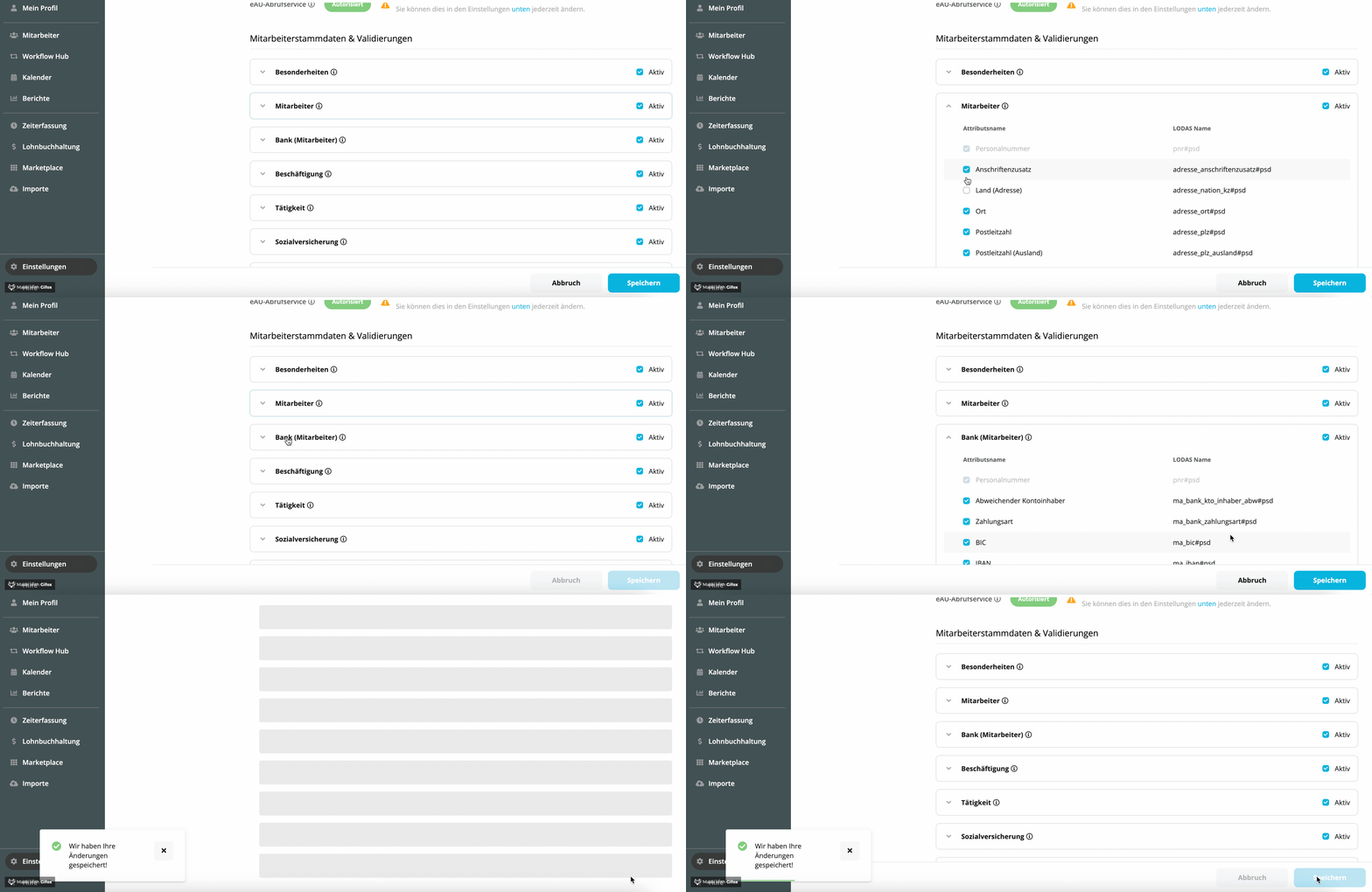
We suggest that you create all of the above-mentioned attributes as part of your configuration process. Under the payroll > Managing > DATEV LODAS/Wage and Salaryyou have the option of excluding individual attributes from the DATEV LODAS/Wage and Salary Export.
Please note:
▶ For attributes excluded from the DATEV export, the system doesn't apply validation rules to the attribute values. Any errors will then not be flagged in payroll.
▶ The following illustration shows the configuration for the DATEV LODAS integration. The same functionality also applies to the integration with Lohn und Gehalt.
What are the precise field descriptions for the DATEV LODAS attributes contained in the ASCII export?
| DATEV attribute | ASCII field description |
| Personnel number | u_lod_psd_mitarbeiter;pnr#psd |
| Email address | u_lod_psd_mitarbeiter;email#psd |
| First name | u_lod_psd_mitarbeiter;duevo_vorname#psd |
| Last name | u_lod_psd_mitarbeiter;duevo_familienname#psd |
| Name prefix | u_lod_psd_mitarbeiter;duevo_vorsatzwort#psd |
| Name suffix | u_lod_psd_mitarbeiter;duevo_namenszusatz#psd |
| Academic degree | u_lod_psd_mitarbeiter;duevo_titel#psd |
| Gender | u_lod_psd_mitarbeiter;geschlecht#psd |
| Birthday | u_lod_psd_mitarbeiter;geburtsdatum_ttmmjj#psd |
| Street | u_lod_psd_mitarbeiter;adresse_strassenname#psd |
| Number | u_lod_psd_mitarbeiter;adresse_strasse_nr#psd |
| Address, addition | u_lod_psd_mitarbeiter;adresse_anschriftenzusatz#psd |
| Postal code | u_lod_psd_mitarbeiter;adresse_plz#psd |
| Address, postcode | u_lod_psd_mitarbeiter;adresse_plz_ausland#psd |
| City | u_lod_psd_mitarbeiter;adresse_ort#psd |
| Address, country | u_lod_psd_mitarbeiter;adresse_nation_kz#psd |
| Place of birth | u_lod_psd_mitarbeiter;gebort#psd |
| Country of birth | u_lod_psd_mitarbeiter;geburtsland#psd |
| Nationality | u_lod_psd_mitarbeiter;staatsangehoerigkeit#psd |
| Married? (Marital status) | u_lod_psd_mitarbeiter;familienstand#psd |
| Hire date | u_lod_psd_beschaeftigung;eintrittdatum#psd |
| End of employment | u_lod_psd_beschaeftigung;austrittdatum#psd |
| Notice pronounced | u_lod_psd_beschaeftigung;kuendigung_am#psd |
| Work permit valid until | u_lod_psd_mitarbeiter;arbeitserlaubnis#psd |
| Residence permit valid until | u_lod_psd_mitarbeiter;aufenthaltserlaubnis#psd |
| Certificate of enrollment valid until | u_lod_psd_mitarbeiter;datum_studienbesch#psd |
| Social security number | u_lod_psd_mitarbeiter;sozialversicherung_nr#psd |
| IBAN | u_lod_psd_ma_bank;ma_iban#psd |
| SWIFT Code | u_lod_psd_ma_bank;ma_bic#psd |
| Different bank account holder | u_lod_psd_ma_bank;ma_bank_kto_inhaber_abw#psd |
| Tax identification number | u_lod_psd_steuer;identifikationsnummer#psd |
| Main/secondary employer | u_lod_psd_steuer;els_2_haupt_ag_kz#psd |
| EU-Sozialversicherungsnummer | u_lod_psd_mitarbeiter;eur_versnr#psd |
| Start of training | u_lod_psd_taetigkeit;ausbildungsbeginn#psd |
| Expected end of training | u_lod_psd_taetigkeit;vorr_ausbildungsende#psd |
| End of training | u_lod_psd_taetigkeit;datum_ben_ergeb_pruef#psd |
| Position | u_lod_psd_taetigkeit;berufsbezeichnung#psd |
| Highest level of educational | u_lod_psd_taetigkeit;schulabschluss#psd |
| Highest professional education | u_lod_psd_taetigkeit;ausbildungsabschluss#psd |
| Contribution group health insurance | u_lod_psd_sozialversicherung;kv_bgrs#psd |
| Contribution group pension insurance | u_lod_psd_sozialversicherung;rv_bgrs#psd |
| Contribution group unemployment insurance | u_lod_psd_sozialversicherung;av_bgrs#psd |
| Contribution group care insurance | u_lod_psd_sozialversicherung;pv_bgrs#psd |
| Social insurance group key | u_lod_psd_taetigkeit;persgrs#psd |
| Weekly hours | u_lod_psd_arbeitszeit_regelm#psd |
| Contract end date | u_lod_psd_beschaeftigung;arbeitsverhaeltnis |
| Disability status | u_lod_psd_mitarbeiter;schwerbeschaedigt#psd |
| Geringverdiener/geringfügig Beschäftigte | u_lod_psd_sozialversicherung;gv_gf_schluessel#psd |
| Main Salary | u_lod_psd_besonderheiten;entlohnungsform#psd |
| IBAN / BIC | u_lod_psd_ma_bank;ma_bank_zahlungsart#psd |
What are the precise field descriptions for the DATEV Lohn und Gehalt attributes contained in the ASCII export?
| DATEV attribute | ASCII field description |
| Personnel number | |
| First name | 470;Vorname |
| Last name | 470;Familienname |
| Name prefix | 470;Vorsatzwort |
| Name suffix | 470;Namenszusatz |
| Academic degree | 470;Akademischer Titel |
| Gender | 480;Geschlecht |
| Birthday | 480;Geburtsdatum |
| Street | 470;Straße |
| Number | 470;Hausnummer |
| Address, addition | 470;Anschriftenzusatz |
| Postal code | 470;Postleitzahl |
| City | 470;Ort |
| Address, country | 470;Land(Nationalität MA-Wohnsitz;Staatsname) |
| Place of birth | 480;Geburtsort |
| Country of birth | 480;Geburtsland(Nationalität Geburtsland;Staatsname) |
| Nationality | 480;Staatsangehörigkeit(Nationenschlüssel Staatsangeh.;Staatsname) |
| Marital status | 480;Familienstand |
| Hire date | 1430;Eintrittsdatum |
| Termination date | 1430;Austrittsdatum |
| Original entry date | 510;Datum erster Eintritt |
| Work permit valid until | 480;Gültigkeit Arbeitserlaubnis |
| Residence permit valid until | 480;Gültigkeit Aufenthalterlaubnis |
| Certificate of enrollment valid until | 480;Studienbescheinigung bis |
| Social security number | 480; Versicherungsnummer(Gueltig_ab;Versicherungsnummer) |
| IBAN | 490;IBAN |
| SWIFT Code | 490;BIC |
| Different bank account holder | 490;Abweichender Kontoinhaber |
| Tax identification number | 650;IdNr |
| European social security number | 480;Europäische Versicherungsnummer |
| Start of training | 3680;Ausbildungsbeginn |
| Expected end of training, as per contract | 3680;Ausbildungsende |
| Actual end of training | 3680;Ende tatsächlich |
| Position | 530;Berufsbezeichnung |
| Health insurance social contribution key | 560;Beitragsgruppenschlüssel(Gueltig_ab;BGS KV) |
| Pension insurance social contribution key | 560;Beitragsgruppenschlüssel(Gueltig_ab;BGS RV) |
| Unemployment insurance social contribution key | 560;Beitragsgruppenschlüssel(Gueltig_ab;BGS AV) |
| Care insurance social contribution key | 560;Beitragsgruppenschlüssel(Gueltig_ab;BGS PV) |
| Social insurance group key | 520;PGS(Gueltig_ab;PGS) |
| Regular working hours | 730;Regelmäßige Arbeitszeit(Gueltig_ab;Wöchentliche Arbeitszeit;Arbeitsstunden Mo;Arbeitsstunden Di;Arbeitsstunden Mi;Arbeitsstunden Do;Arbeitsstunden Fr;Arbeitsstunden Sa;Arbeitsstunden So;Wö. AZ Vollzeit) |
| Contract end date | 1430;Befristetes Arbeitsverhältnis |
| First payroll month | |
| Employer identification | 650;Anmeldedaten Elster II(Gueltig_ab;Kennzeichen Arbeitgeber;Gewünschter jhrl. Freibetrag) |