Note
This feature is actual in the BETA stage and will be gradually made available to all Personio Payroll customers.
This article explains the legal basis of the company car, how to set up and manage the company car agreements in Personio Payroll, and the reflection on the payslip.
What is a company bike?
If an employer provides an employee with a bicycle or e-bike free of charge or at a reduced price for private use, it is considered a company bike as a taxable benefit. For the tax and social security law assessment, one distinguishes between the following models:
- Bicycles and Pedelecs (E-Bikes) with motor assistance up to 25 km/h are legally considered bicycles. There is no license plate or insurance requirement for this.
- S-Pedelecs with motor assistance up to 45 km/h are legally considered motor vehicles and are subject to license plate and insurance requirements
Note
Personio Payroll is actual only able to represent bicycles and e-bikes via the company bike functionality.
Tax treatment of service workers
The tax assessment depends on whether the employer grants the company bike for private use in addition to the salary already owed, or if the transfer is made as part of a salary conversion.
- If the employer provides the company bike in addition to the salary already owed as Gehaltsextra, the monetary advantage remains tax-free until December 31, 2030, according to § 3 No. 37 EStG.
- If the transfer takes place as part of a salary conversion, a taxable benefit is set at one quarter of 1% of the non-binding recommended retail price (RRP), rounded up to a full €100.00. This regulation according to § 8 (2) sentence 10 EStG applies to company bikes purchased between January 1, 2019 and December 31, 2030.
Example
The suggested retail price of a service tire is €4,890.00. A quarter of that is €1,222.50, rounded to the nearest €100.00, that is €1,200.00. The monthly deemed benefit is 1% of €1,200.00. Accordingly, also €12.00 per month.
Carefully check the financing models before setting up in Personio Payroll, as subsequent changes can trigger retroactive amendments of already approved payroll periods.
Social insurance-related treatment
The social security law assessment of a company car generally follows the income tax treatment according to § 1 (1) Sentence 1 No. 1 SvEV. Is the monetary advantage tax-free, does it also mean exemption from social security contributions? However, if taxable salary is present, for example with a salary conversion, the monetary advantage is also subject to social security contributions.
Manage company bike in Personio Payroll
Before you begin
To create a service bike agreement, you need access to the Compensation tab in the employee profile of the affected employee. Have the contract from your leasing provider ready before setting up, which should contain all the necessary information.
Product limitations
The feature does not currently support the following cases:
- S-Pedelecs: E-bikes with motor assistance over 25 km/h are actual not supported. Use the widget for the company car agreement for this. For further information, please see the article on the topic. Alternatively, you can also use a manual solution via separate wage types.
- Purchase after lease end: If an employee acquires the company bike after the end of the lease term, the monetary advantage from the acquisition must be manually recorded via a salary type. Terminate the existing agreement in this case.
- Connection to leasing provider: An automatic connection to leasing providers such as JobRad, Bikeleasing or BusinessBike does not exist. Enter the information from the contract directly into the corresponding field.
- History: Changes to an agreement affect the payslip retroactively. A change effective as of a specific date is not possible and must be reflected by establishing a new agreement.
- Availability: The service wheel widget is available exclusively to Personio Payroll customers in Germany.
Set up service agreement
To upload a service vehicle agreement in Personio Payroll, follow these steps:
- Navigate to the employee profile of the affected employee and open the compensation tab.
- Click on Add > ServiceWheel.
- Deposit the term of the agreement:
- The beginning of the agreement.
- Optional the term of 24, 36 or 48 months.
- The optional End of agreement is calculated automatically based on the term or can be manually set.
- Record the details of the bicycle:
- The brand, the model and the frame/serial number of the bicycle
- The suggested retail price (MSRP). The basis for evaluation is calculated automatically from the UVP.
- Choose whether it is a salary conversion or a salary extra.
- Submit the details of the lease agreement:
- The leasing provider, as well as the order reference.
- The amount of the total monthly lease rate.
- Optional an employer subsidy.
- Indicate whether the employer subsidy should be shown separately on the payslip.
- Click Save.
Personio Payroll automatically calculates the taxable benefit and salary conversion based on the stored information.
For setting up multiple service agreements at the same time, an import template is also available to you. Please contact Payroll Support to receive the template if you did not receive it during your Personio Payroll implementation.
Manage service agreement
After setup, you can edit, pause, end, or clear a service agreement at any time. An employee can have multiple service vehicle agreements at the same time. Personio Payroll sums up all non-cash benefits in the payslip in this case.
| Action | Effect |
| Edit | Changes take effect retroactively from the start of the agreement and amendments for already invoiced periods will be triggered if applicable. |
| Pause | You can choose between several options here. |
| End | The agreement ends on the chosen date. The monetary advantage and the salary conversion are thereby eliminated. |
| clear | The agreement is completely and retroactively removed. |
Edit agreement
To edit an existing service agreement, follow these steps:
- Navigate to the employee profile of the affected employee and open the compensation tab.
- Open the corresponding service agreement.
- Click on Edit agreement and confirm the notice.
- Adjust the affected details.
- Click Save.
Since the changes apply retroactively from the start of the agreement, there may be a correction of already approved billing periods.
Pause agreement
For longer team calendar such as parental leave or sickness-related incapacity to work outside the salary continuation period, three pausing options are available to you:
- Keep the bicycle, leasing rate will be taken over: The employee keeps the bicycle and the taxable benefit continues, but the salary conversion is suspended, for example, if the employer or an insurance company takes over the lease payment. Select the option postpone salary conversion, monetary advantage continues.
- Bicycle is returned: Both the deemed benefit and the salary conversion are suspended. Select the option defer taxable benefit and salary conversion.
- Keep the bicycle, employee continues to pay: The employee keeps the bicycle and both the taxable benefit and the salary conversion continue. However, the salary conversion will continue as a net deduction because there is no remuneration to convert. Choose option Continue both: Salary conversion becomes net deduction.
To add an interruption to an existing agreement, follow these steps:
- Navigate to the employee profile of the affected employee and open the compensation tab.
- Open the corresponding service agreement.
- Click on Add interruption to agreement.
- Enter the start date and the end date.
- Choose the pausing option you would like to use for the interruption.
- Click on Add interruption.
Terminate the agreement.
To terminate an existing service agreement, follow these steps:
- Navigate to the employee profile of the affected employee and open the compensation tab.
- Open the corresponding service agreement.
- Click on End agreement.
- Optionally store the runtime. Based on that, the end date is calculated automatically. If you have not entered a runtime, use the field End date.
- Click on Confirm.
You can view already terminated service agreements in the Overview > Terminated Agreements at any time.
Clear agreement
To completely clear an agreement, follow these steps:
- Navigate to the employee profile of the affected employee and open the compensation tab.
- Open the corresponding service agreement.
- Click on Delete agreement.
- Confirm the notice.
Commuting allowance on the payslip
Figure in the payslip
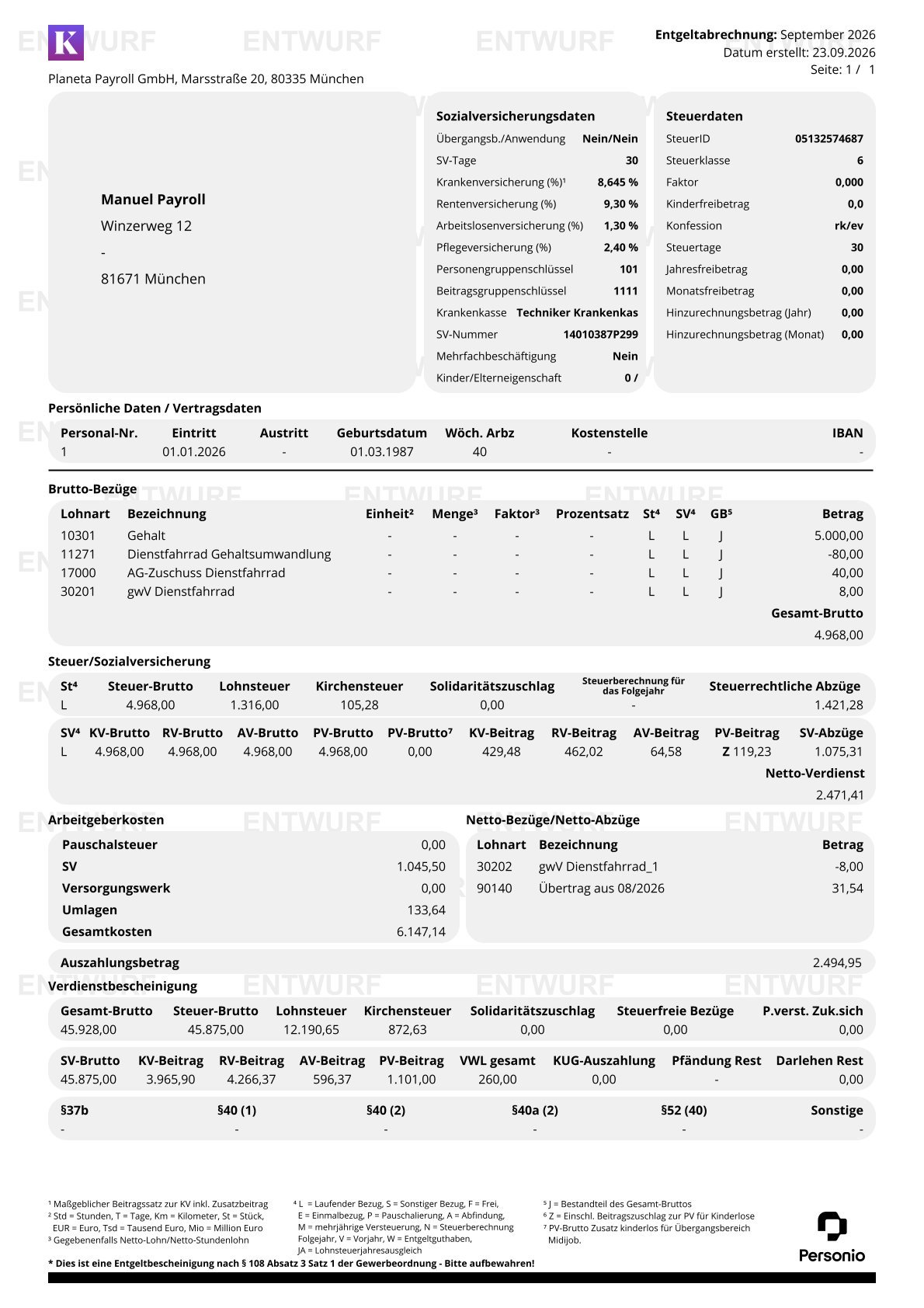
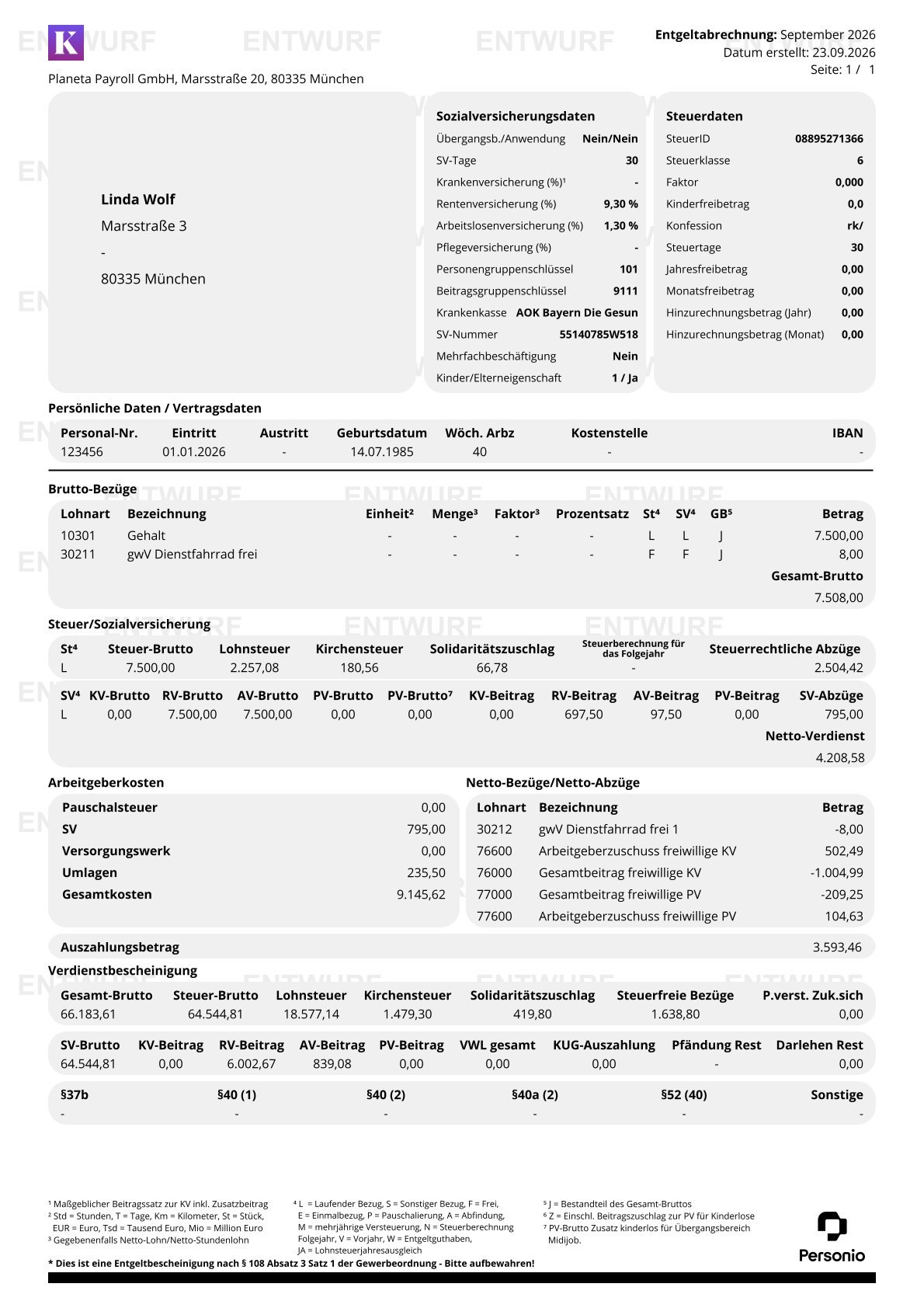
Every service agreement is automatically assigned fixed wage types and shown as a separate position on the payslip. Here, the monetary benefit and salary conversion are separated, and if specified, the employer subsidy is shown separately. If a people has multiple service vehicles billed at the same time, they will be listed separately.
| Salary conversion | Salary extras |
 |
 |
Types of wages on the payslip
Gross wage types
| Number | Name | Tax | Social insurance | Model |
| 11271 | Company bike salary conversion | taxable | SV-obligatory | Salary conversion |
| 17000 | AG subsidy service bike | taxable | SV-obligatory | Salary conversion |
| 30201 | gwV Service bike | taxable | SV-obligatory | Salary conversion |
| 30211 | gwV Service bike | tax free | SV-free | Salary extras |
Net deductions
| Number | Name | Model |
| 30202 | gwV Service bike | Salary conversion |
| 30212 | gwV Service bike | Salary extras |
| 54000 | Net removal service bicycle | Break with net deduction |
FAQ
Can employees use a company car and a company bike at the same time?
Yes. Personio Payroll treats company cars and company bikes as separate agreements. Both non-monetary benefits can exist in parallel.
What happens if I want to register an S-Pedelec as a company bike?
S-Pedelecs with motor assistance over 25 km/h are not supported in the current version. Use the company car feature for this.
Can an employee lease multiple company bikes at the same time?
Yes. Personio Payroll supports up to four employment agreements per employee in parallel.
How do I handle the purchase of the service bike after the end of the lease term?
Terminate the existing agreement and manually record the taxable benefit from the acquisition using a wage type. Automatic processing is not currently provided.
Do changes to an agreement affect already invoiced months?
Yes. Changes to a service agreement are retroactive to the start of the agreement and may require correction of already processed billing periods.