Short time work is aTemporary reduction of working hours in the company, combined with a corresponding reduction in remuneration. The goal is to cushion temporary economic difficulties – for example due to declines in orders or production – with the help of short-time work allowance.
Requirements for short time allowance (§ 95 SGB III):
- Significant loss of work with loss of earnings
- Personal eligibility requirements are met
- Company eligibility requirements are met
- The loss of work is reported to the Employment Agency
Further general information on short time work can be foundin our article on theme.
Company Settings
Before you begin
If your organization short time allowance (KUG) has been applied for, please first contact our Payroll Support. This will first set up the necessary attributes in the employee profile for you.
You can then take the following steps to file short-time allowance for your organization at both company and permanent establishment level.
Store KUG in the company settings
Learn about settings
To store short time work for your organization, you need the following information, which you must insert as fields in the settings:
| Field in settings | Description and notes |
| KUG approval period – start date | The effective date for KUG is stored in this field. As a rule, this is the 1st of the month from the approval period. |
| KUG approval period – end date | In this field, the end date for KUG is stored. KUG is granted for a maximum of 12. Exceptions can be made by the Federal Government. |
| Affected part of the company |
In this case, the affected part of the company is stored as free text. Example: Production, Administration |
If you do not make these settings, no short-time equivalents are stored in the payroll account. Please note that it is no longer possible to create a new payroll account retroactively after the payslip has been released.
Note:
The Federal Government can extend the period of entitlement to up to 24 months by ordinance. This extension is currently in effect until 31 December 2025.
Store information
To activate the settings for short time work for your organization, proceed as follows:
- Go to the section payroll.
- Choose the correct one legal entityfor which short time work is to apply.
- Switch to the tab Managing > Social Security.
- Activate the switch Short time work registeredat the company and business premises level.
- Enter the necessary information as described in the section above.
- Set an effective date and save the changes.
Employee attributes
One-time information
About KUG attributes
You must store the following attributes for each employee once per short-time reference period:
| Attribute | Input | Description and notes |
| Receives Kurzarbeitergeld | Yes / No | If "Yes" is made as the selection, further information must be provided for the short-time limit calculation. If the field is empty or the selection "No" is selected, no short-time allowance will be billed for the employee. |
| Application for benefits: KUG number |
For instance: K12345678 or TK-1234567 |
The number is assigned by the Federal Employment Agency. |
| Application for benefits: Loss of work number |
For instance: AA-1234 |
The loss of work number is a unique identifier issued by the Employment Agency for each specific loss of work in the context of short time work. |
| start date short time allowance | TT. MM.YYYY | As a rule, this is the 1st of the month from the approval period. |
| End date of short time allowance | TT. MM.YYYY | In this field, the end date for KUG is stored. KUG is granted for a maximum of 12. Exceptions can be made by the Federal Government. |
Store information
To enter the general information on short-time equivalents for the employee concerned, proceed as follows:
- Go to the relevant employee profile.
- Switch to the tab Information.
- Go to the section short time work (KUG) and click Edit.
- Enter the necessary information once per short-time reference period, as described in the section above.
- Set an effective date and save the changes.
For more information about editing attributes, see in our article on theme.
Monthly data
You must customize the following attributes monthly. Read in the section above, how to do this:
| Attribute | Input | Description and Note |
| Target hours | XXX.XX |
The monthly target hours that the employee would have worked without short time work.
Calculation of salary earners: Weekly working hours * 13 weeks / 3 months |
| Lost hours | XX.XX |
The total monthly hours in which working hours were lost due to short-time work. All hours are listed here, including:
|
| Sick without continued payment of wages (in hours) | XX.XX |
The monthly hours in which the employee is ill during short time work.
Requirement:
|
| Sick (in hours) | XX.XX |
The monthly hours in which the employee is ill during short time work.
Prerequisite:
|
| Holidays (in hours) | XX.XX | The monthly hours on which KUG and a public holiday took place at the same time. |
| Actual hours worked | XX.XX | The hours actually worked each month (excluding, for example, unpaid leave). |
| Employer subsidy KUG (€) | XX.XX |
If an employer's contribution to KUG is paid, the full amount must be entered here. Personio automatically calculates the SV-free and compulsory share. |
| Performance Rate Group | 1 or 2 |
Performance rate 1 = 67 % Performance rate 2 = 60 %
The attribute only needs to be filled if a different service rate is to be used.
Example:
→ In this case, benefit rate 1 must be deposited. |
| Additional income from other employers during short-time work (€) | XXXX.XX |
With this attribute, a distinction must be made between two scenarios:
|
| Contribution reduction during short-time saving time limit - start date | DD/MM/YYYY |
Voluntarily insured persons can apply for a reduction in contributions while receiving short-time allowances. As soon as a confirmation from the health insurance company is available, the start date of the exemption must be entered in the attribute. |
Example:
A organization is registering short time work with the Employment Agency on August 1. Working hours are to be reduced by 50% per day for the affected employees. The following information is available for the employee:
- The employee who works in Berlin has no children within the meaning of tax law (= benefit rate 2).
- His monthly earnings amount to € 3,500.00 for 40 hours per week.
- His daily working hours are reduced from 8 to 4 hours.
- The month of August has a total of 21 working days.
- In August, he was unable to work for 3 working days and was ill with a entitlement to continued payment of wages.
The following values must be stored in the employee profile
| Attribute | Wert |
| Receives short time work | yes |
| Application for benefits: KUG number | K12345678 |
| Application for benefits: Loss of work number | AA-1234 |
| start date short time allowance | 01.08.2025 |
| End date of short time allowance | 31.07.2026 |
| Target hours |
173,33 (= 40 weekly working hours * 13 weeks / 3 months) |
| Lost hours |
84 (= 21 working days * 4 hours) |
| Sick (in hours) | 12,00 |
| Actual hours worked |
89,33 (= 173.33 target hours - 84 lost hours) |
Special features for hourly workers
In the case of hourly wage-earners, in the Salary tabthe hours that would actually have been worked without the loss of short time work are deposited for the full month. This involves the following steps:
- Go to the relevant employee profile.
- Switch to the tab Salary.
- In the column base salary to the current month.
- Enter the hours and confirm your entry.
Please note:
This entry overwrites all entries in the Attendance tab for that period, including holidays.
Alternatively, you can also enter the target hours in the Attendance tab for the individual days. Then enter the data on short-time work in the Information tab,as described above.
Special features in the event of incapacity for work due to illness
In the event of incapacity for work due to illness during short time work, further information must be provided under Additional information during the time off. In order for these fields to be visible, the attribute Receives short time work on Yes . This involves the following steps:
- Go to the relevant employee profile.
- Switch to the tab time off.
- Open the time off you want to edit and click on the pencils icon in the top right.
- Under Additional informationyou can now enter further information on time off and short time work.
- Save your changes.
Inability to work due to illness and short time work full-time
Requirement: The employee would have had100% short time allowance (KUG) receive.
Procedure:
- The time off is entered in the tab time off for the entire day of illness.
- Subsequently, under Additional information in the field "In the case of short time work: On which days during the illness would the employee have received the full short time allowance?", the days on which short time work and illness coincide.
- The data is displayed in the format YYYY-MM-DD Deposited. Example: 2025-08-31,2025-09-01
- You will then need to enter the sick hours in the employee profile under Information, depending on the case in the following attributesdeposit:
- Sick without continued payment of wages (in hours) or
- Sick (in hours)
Incapacity for work due to illness and short time work prorated per day
Prerequisite: On the day of illness, the employee would only haveprorated short time allowance (KUG) oriented.
Procedure:
- The time off is entered in the tab time off for the entire day of illness.
- Subsequently, under Additional information in the field "On which days and for how many hours is the employee prorated in short time work during the time off?", the days on which short time work and illness coincide must be entered.
- The data is displayed in the format YYYY-MM-DD:HR Deposited. Example: 2025-08-31:4,2025-09-01:4
- You must then enter the sick hours in the employee profile under Information, depending on the case in the following attributes:
- Sick without continued payment of wages (in hours) or
- Sick (in hours)
Documents in Personio Payroll
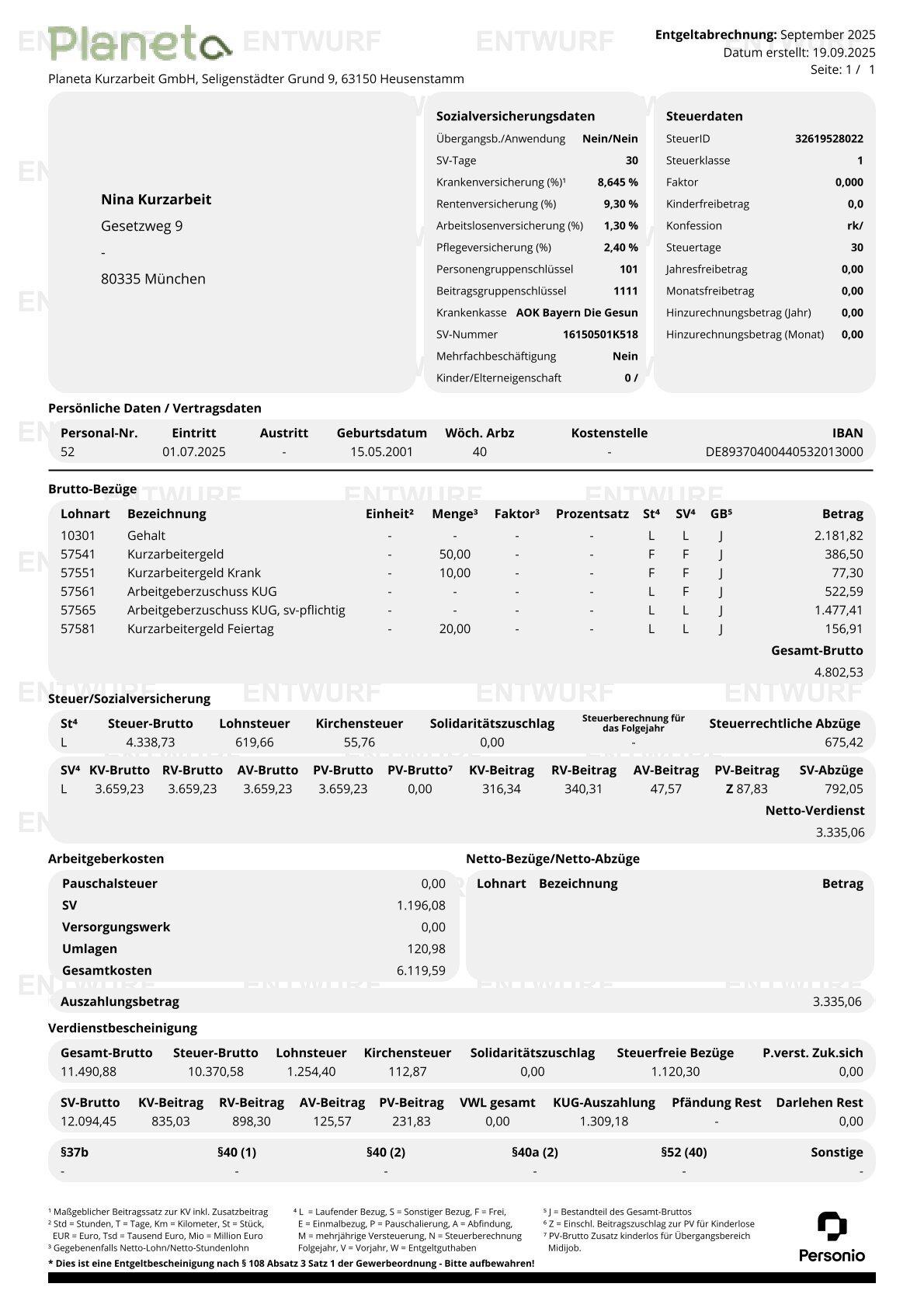
Remuneration certificate
On the Remuneration certificate the KUG remuneration is all shown in gross. Personio uses the following types of wages:
| Salary type | Description |
| 57540 short time allowance |
With this type of wage, the hours and the short-time allowance amount are shown on the remuneration certificate. The certificate only contains values that refer to the short time allowance (KUG). Excluded from this are the following information from the attributes of the employee profile:
|
| 57550 short time allowance sick | This wage type includes the values from the "Sick (in hours)" attribute in the employee profile. Both the number of hours and the corresponding amount are shown on the salary statement. |
| 57577 short time allowance public holiday | Here, the hours and amount are taken from the employee profile based on the "Holiday (in hours)" attribute. |
|
57565 Employer's subsidy KUG, subject to social security 57560 Employer Subsidy KUG |
If an employer subsidy is paid, it is taken from the attribute employer subsidy KUG (€) from the employee profile and broken down accordingly in accordance with the legal requirements as a sv-free or sv-obligatory remuneration. |
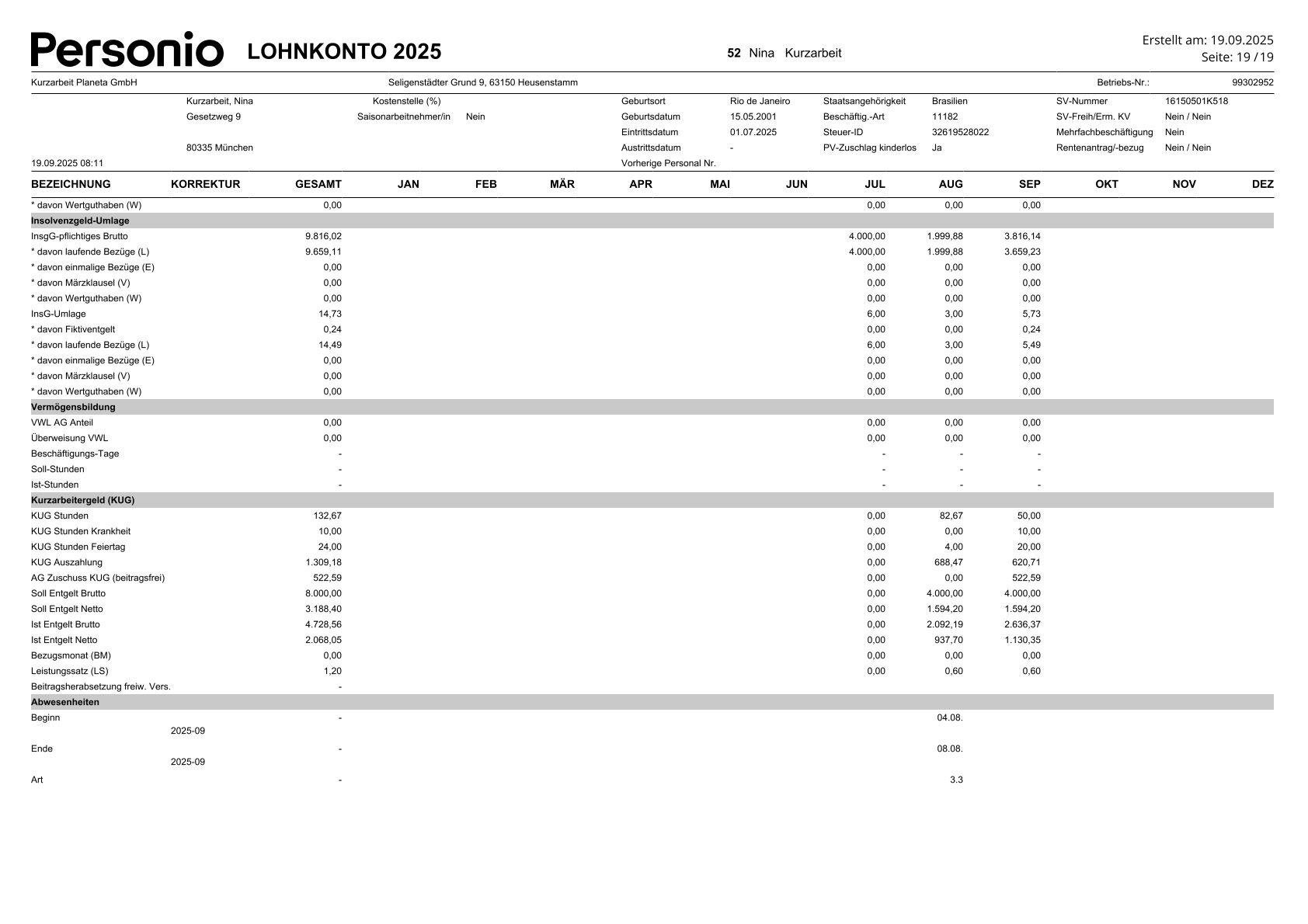
Payroll account
In payroll account, the relevant payroll data for short time allowance (KUG) is presented in a separate section. This information can be used to complete the evaluation for the application for the KUG reimbursement.
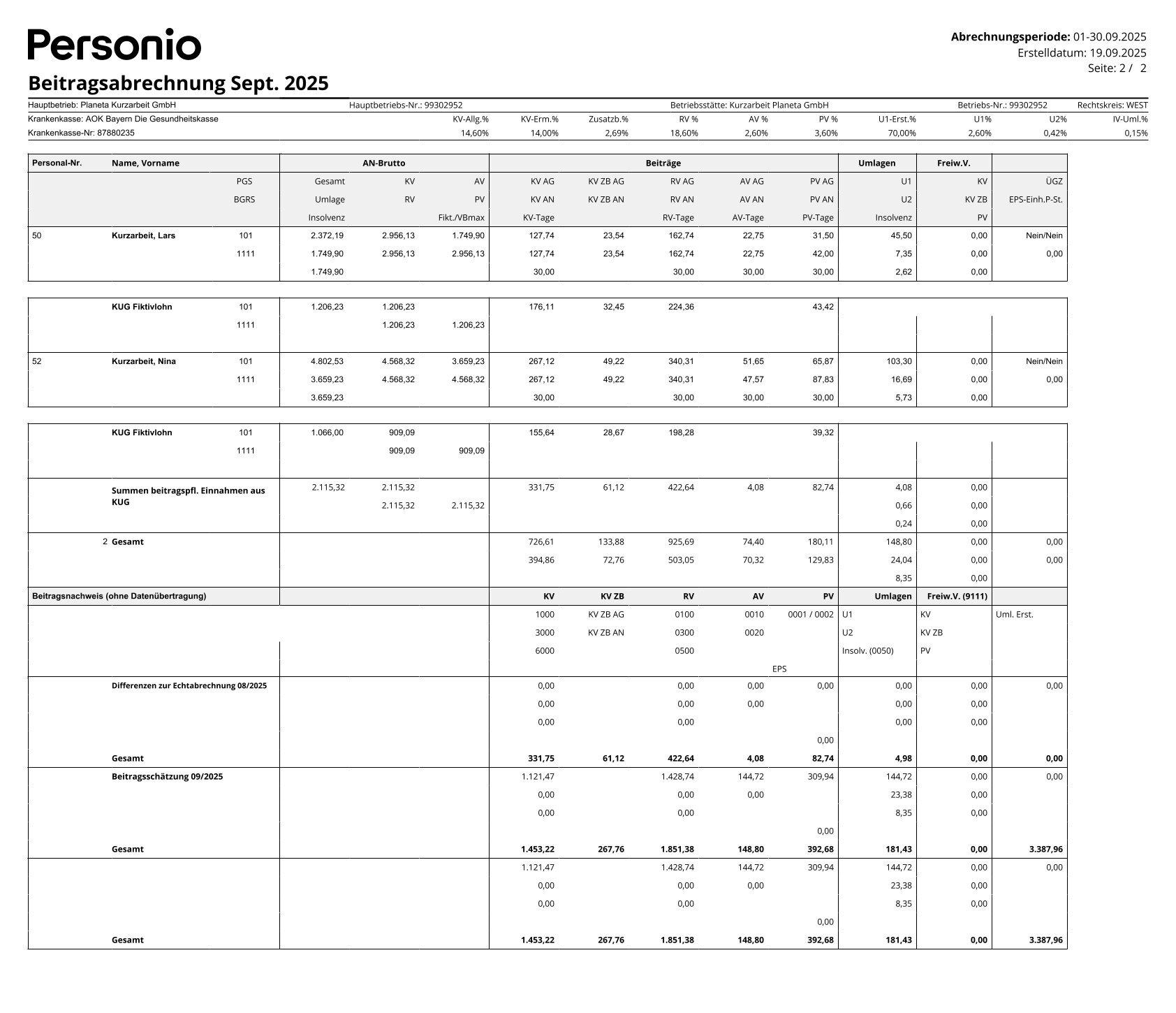
health insurance accounting report
In the document Social health insurance accounting report the current amounts and the KUG fictitious salary are shown separately. The notional wage is calculated as 80% of the difference between the unrounded gross target and actual remuneration. The entire contributions from the fictitious salary are borne by the employer.
contribution statement to the Employment Agency
KUG Settlement Lists
After you have successfully approved the payroll run, the next step is toKUG Settlement List for the Employment Agency. You will need the following documents:
- Employee's payroll account
- Employee's salary certificate
- KUG and default number for your organization
- Company number of your company
When filling out the payroll list, do the following: