We're moving to a new overtime system. It's a more accurate, transparent engine that makes it easier to see exactly how a balance is calculated. The system now handles long-standing calculation edge cases and introduces a more reliable monthly overtime threshold calculation. We're also introducing balance resets, letting you set a balance to an exact value on an exact date. Throughout the migration, your employees' current overtime balances will stay the same.
Moving to the new system also opens the door for future improvements. These improvements include compensating premium hours worked (for example, public holiday, night, or weekend surcharges). We’re also planning to make it easier for employees to request time off in lieu.
Before reading on, check that this article is for you:
- If you were already tracking overtime in Personio, then this article is for you. You don't need to do anything to prepare, but keep reading to understand what's changing and what to expect.
- You can skip this article if your Personio account was created after 8 July 2026. You can also skip it if you weren't tracking overtime in Personio before 29 July 2026. In these cases, you're already on the new overtime system. There's no need for us to migrate your data to the new system.
Transition timeline
The following table shows what happens before, during, and after your migration. We're starting the rollout on 5 October 2026 and continuing it in stages. If you can’t see the new overtime experience right now, we haven’t rolled it out to your account yet.
| When | What |
| At least 48 hours before your migration | You receive an email letting you know we're about to move your organization to the new overtime system. |
| On your migration date | We move your organization's overtime data to the new system. Your employees' current balances stay the same. We also create a new definition of each existing overtime policy to protect your historical data from the migration. Read more below. |
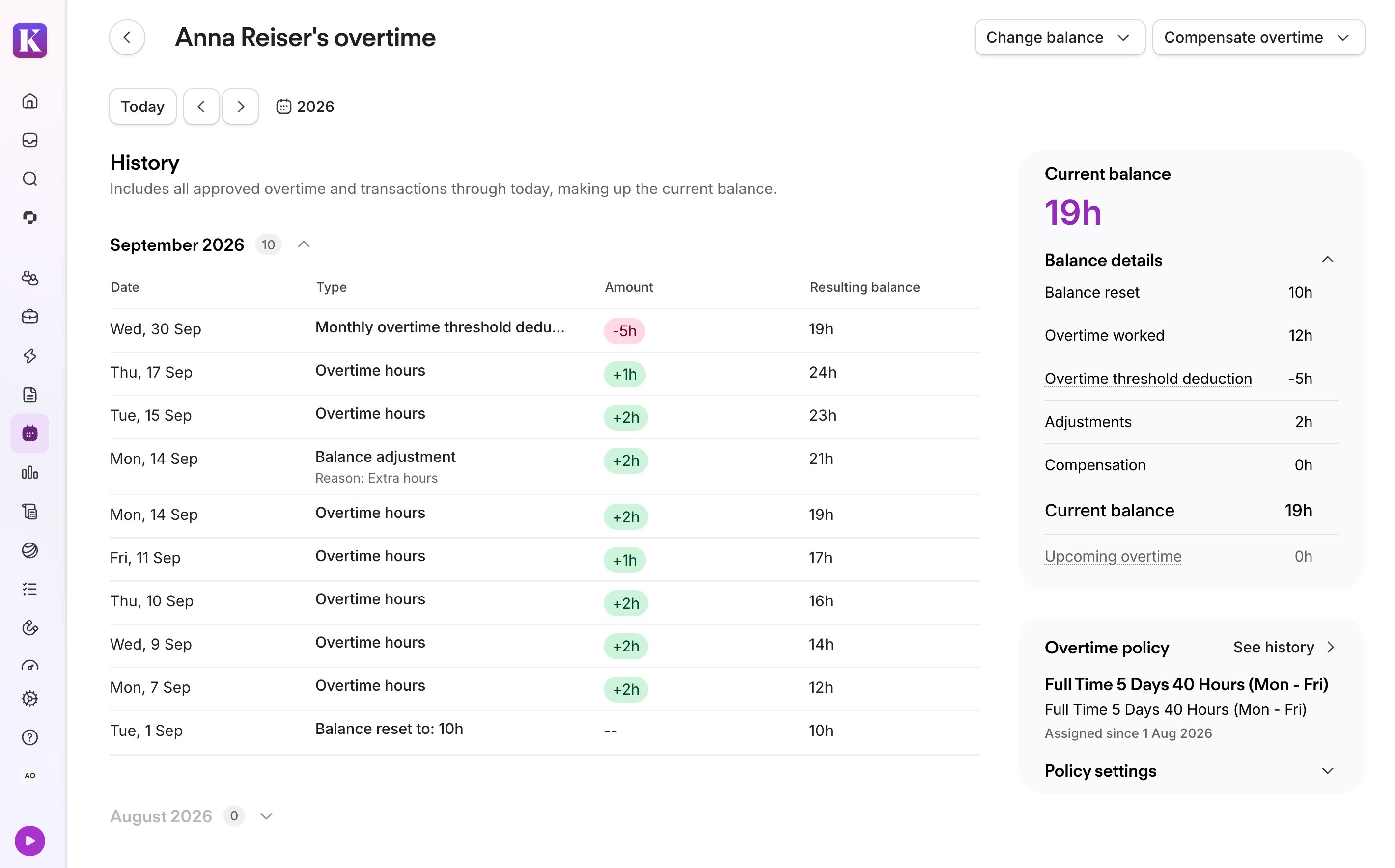
| After your migration | The system calculates overtime and deficit hours using the new logic. Use the Current balance breakdown to see how each employee's balance is made up. |
This migration is mandatory, and you cannot postpone or skip it. We’ll retire the current overtime system once your organization reaches general availability on the new system.
Key improvements
The new overtime system brings several improvements. The table below gives a summary of what’s changing and how it benefits you.
| Improvement | Before | After |
| Clearer, more explainable balances | There was no detailed breakdown of what made up a balance. There was also a lack of clarity over the events that led to it. |
A Current balance overview breaks down what makes up the balance. The History overview shows a log of every event, overtime worked, deficit hours, adjustments, and compensations that led to the current balance. This means you can see exactly why a balance is what it is, without having to figure it out by yourself. Learn more about how to review your employees’ overtime under the new experience. |
| The option to add a comment when compensating overtime or making balance adjustments | When compensating overtime or adjusting a balance, there was no option to add a reason or comment explaining why. | You can add a reason or comment when compensating overtime as pay or time off. You can also do so when adjusting an overtime balance. Employees can see these comments, so they understand the changes without needing to ask. |
| More reliable overtime calculations for edge cases |
The system had long-standing edge cases that could produce unexpected balances. For example, a mid-week work schedule change applied the new schedule retroactively to the entire week, ignoring the previous schedule. |
The new system handles these edge cases correctly by design. This means balances are correct the first time, without you needing to identify and correct them afterward. For example, a mid-week work schedule change now respects the effective date of the new policy. It applies the previous policy to prior days so target hours are calculated correctly. For the list of these calculation edge cases, see Other changes below. |
| Balance resets | You could only add or deduct a relative amount from a balance. There was no way to set it to a specific value directly. |
You can reset an overtime balance to an exact value on a specific date. You can do this for one employee directly from their overtime page or for multiple employees at once using the Overtime balances import. A balance reset overrides all overtime, thresholds, and other transactions up to and including that date. Balance resets apply at the end of the effective date you select. For example, to set a balance of 0 hours starting 1 January, you need to set the effective date to 31 December. It therefore gives you a clean, accurate starting point whenever you need one. |
| A compliant monthly overtime threshold calculation | The system applied the monthly overtime threshold before offsetting any deficit from the previous month. Overtime only counted toward the balance once an employee's hours exceeded the threshold. | The system now offsets any deficit from the previous month first, then applies the threshold. This gives you an accurate, compliant final balance for employees close to the threshold. Learn more about changes to the monthly overtime threshold. |
Explore the new overtime system
If you can't see the new overtime experience, we haven't rolled out the update to your account yet. We're starting the rollout on 5 October 2026 and continuing it in stages.
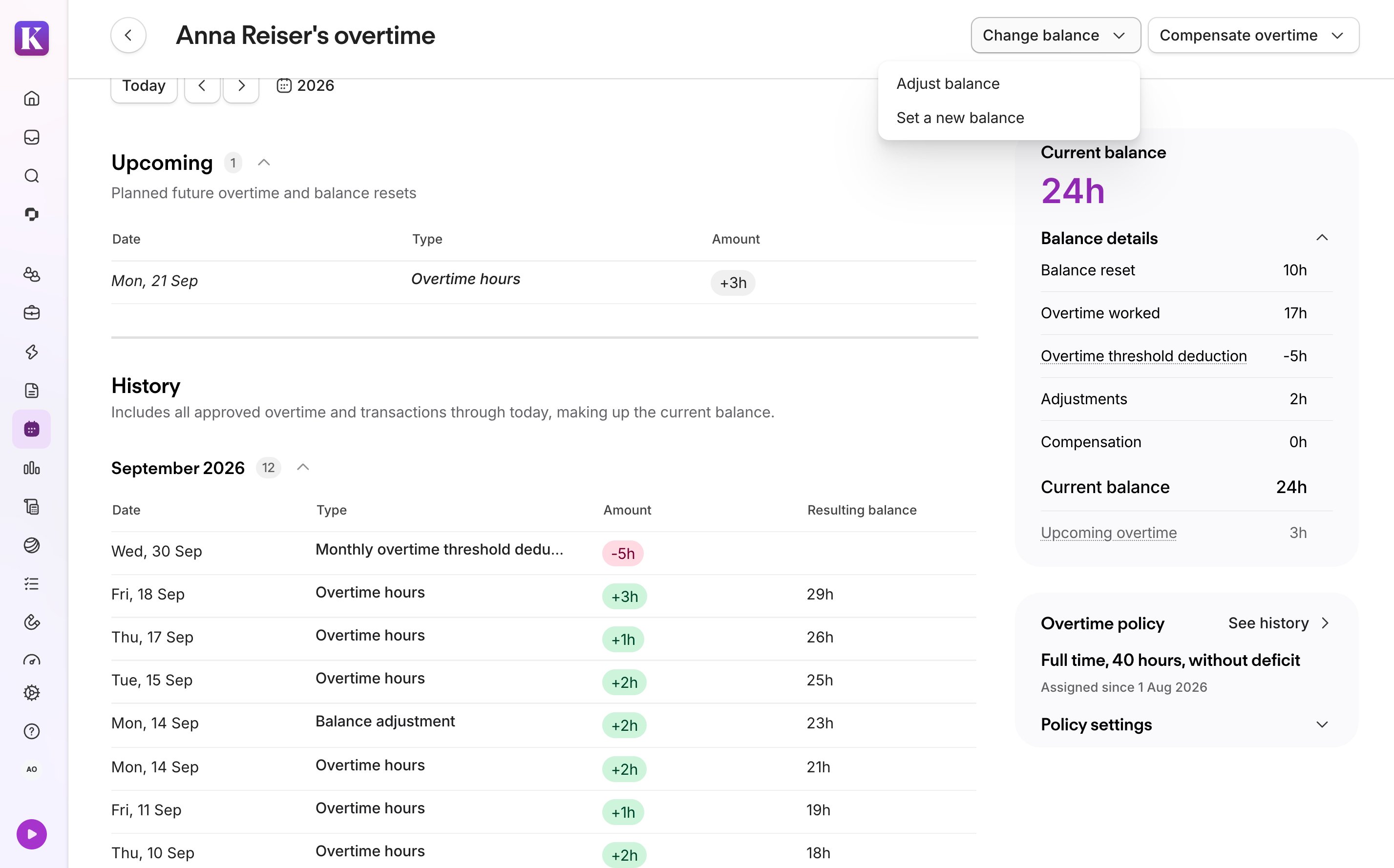
You can access an employee's overtime via the Overtime widget on their Attendance tab. Click Balance details to open their overtime page. On the overtime page, you can review their full activity, adjust their balance, and compensate overtime as a payout or as time off. Learn how to manage overtime under the new experience.
What you need to do
We'll automatically migrate your account to the new overtime system. Your employees' overtime balances stay the same, and we'll notify you before and after the change happens. We recommend you take some time to explore the new experience. Also, let your employees know that their overtime page is changing.
Once you've migrated, here are a few things you may find useful:
- Review the Current balance breakdown for a sample of employees to confirm their balance looks as expected.
- Remember that you can now reset a balance to a specific value on a specific date. This is useful if you ever need to correct a balance.
- Understand how the new overtime recalculation window works. This is particularly relevant if you need to make retroactive changes with an effective date before 1 December 2025.
- We've improved the calculation logic for the monthly overtime threshold. If you use a monthly overtime threshold in your overtime policy, review how it works now.
- The system now calculates overtime and deficit hours regardless of employee status. This may be relevant if you have employees with the status attribute Leave or Inactive. If you don't want deficit hours to build up during this time, you have two options:
- Turn off the deficit tracking settings in the employee's overtime policy. If other employees share that policy, duplicate it instead and turn off deficit tracking on the copy. Alternatively, assign an existing policy that already has deficit tracking off, so the change only affects the relevant employee.
- Add a time off period for the absence. Ensure you set the following time off type setting to yes: Reduce target hours and count any time tracked as overtime during time off?
Understand overtime recalculations
Whenever you make a change that affects an overtime balance (for example, editing past attendance or time off entries), Personio automatically recalculates the impacted balances. This helps to keep your records accurate.
- How it worked previously: The previous system strictly limited recalculations up to a single fixed cut-off date, 1 November 2025. It didn’t automatically recalculate the balance for any changes before that date. The previous system also applied the cut-off date account-wide.
- What’s changing for your existing policies: We’re moving away from account-wide cut-offs. Instead, the cut-off is attached to individual overtime policies.
Existing overtime policies
For all your existing overtime policies, the system now uses 1 December 2025 as the functional overtime cut-off. With this in mind, here's what to expect when you make a backdated change:
- Changes with an effective date from 1 December 2025 onward: The system automatically recalculates the affected overtime balances.
- Changes with an effective date before 1 December 2025: Balances remain safely locked. The system preserves your historical entries without triggering automatic recalculations.
Note:
If you need to make a change and recalculate overtime with an effective date before 1 December 2025, we don't recommend reassigning or editing a policy to do this. This can trigger a full recalculation for everyone on that policy and overwrite historical values. This is irreversible. If you need to make such adjustments, contact Personio Support for guidance.
What you’ll see in your account
To protect your historical data from unintended changes, Personio automatically creates a new policy definition. You'll then see the following definitions in your account:
- From 1 December 2025 onward: This is the new policy definition and the active, editable one moving forward. It applies the new system’s logic.
- Before 1 December 2025: This definition preserves your historical data using the old system's logic.
You may notice both definitions listed under a given overtime policy. For example, you may see them in your overtime policy settings. You may also see them in the historical policy overview of the employee’s overtime page. This is completely expected and serves as an audit trail of the transition. Your employees will still only see a single, unified overtime balance. The dual setup exists purely behind the scenes to keep past data secure.
Newly created policies going forward
Any new overtime policy you create from now on applies our standard rolling recalculation window. Instead of relying on fixed cut-off dates, the system automatically recalculates entries within a dynamic range, applying the new overtime system’s logic:
- 10 years into the past (starting from 1 January of the calendar year 10 years ago).
- 2 years into the future (ending on 31 December of the calendar year 2 years ahead).
For example, in 2026, this window runs from 1 January 2016 to 31 December 2028. The window moves forward by one year every 1 January, so it always covers the same span relative to today.
Understand changes to the monthly overtime threshold
If your overtime policy uses a monthly overtime threshold, read on to learn how it works after the migration.
How deficits are offset against the threshold
The order in which the system offsets a deficit against the monthly overtime threshold has changed. Here's how the calculation compares before and after the migration.
| Before | After |
|
The system applied the monthly threshold before offsetting any deficit from the previous month. This meant overtime had to cover the threshold before the system counted it towards the overtime balance. Example: Julia's overtime policy has a 10-hour monthly threshold.
|
The system offsets any deficit from the previous month first, then applies the threshold. Example: Julia's overtime policy has a 10-hour monthly threshold.
|
How balance adjustments and resets affect the threshold
A balance adjustment doesn't count toward the threshold. If you make a balance adjustment in one month, it becomes part of the starting balance for the next month. This hasn't changed.
Balance adjustment example:
Alfred's overtime policy has a 10-hour monthly threshold.
- He ends June with a surplus of 6 hours.
- In July, he tracks 12 hours of overtime. Separately, an HR Manager makes a -3 hour balance adjustment to correct an earlier mistake.
Balance adjustments don't go through the threshold calculation. The system works out July's balance using only the surplus and the tracked overtime:
- Of the 12 overtime hours Alfred tracks, the 10-hour threshold means only 2 hours count toward the balance.
- Added to his 6-hour surplus from June, that gives 8 hours.
- The system then applies the -3 hour adjustment directly on top of that 8.
- Alfred's balance at the end of July is 5 hours.
A balance reset works differently. If you set a balance reset partway through a month, Personio treats that new balance as the starting point for the rest of the month. The system ignores any overtime or deficit hours from earlier in that month when calculating the threshold.
Balance reset example:
Alfred's overtime policy has a 10-hour monthly threshold.
- He tracks 12 hours of overtime in the first half of July.
- On 15 July, an admin sets a balance reset to 5 hours.
Setting a new balance resets the starting point for the threshold calculation. The system works out the rest of July using only the reset and the overtime tracked afterward:
- The threshold calculation for July ignores the 12 hours Alfred tracked before the reset.
- From 15 July onward, the system treats 5 hours as the starting balance for the rest of the month. The 10-hour threshold applies afresh to anything he tracks after that.
- He tracks 8 more hours of overtime before the end of July. This doesn't exceed the fresh 10-hour threshold, so it doesn't count toward the balance yet. (Remember that the threshold calculation for July ignores the 12 hours Alfred tracked before the reset.)
- Alfred's balance at the end of July stays at 5 hours.
Other changes
Many of the changes below are small and won't affect your day-to-day work. We've included them here for full transparency. This includes some specific calculation edge cases, which the new system now handles correctly by design.
| Event / Behavior | Before | After |
| Calculation edge cases | ||
| Future-dated time off and deficit hours |
Requesting time off for a future date reduced the overtime balance immediately. Tracking 0 hours on a future date also created a deficit immediately. This is a workaround your employees might have used to schedule time off in the absence of an employee-led time off in lieu feature. |
The balance only changes on the future date itself. This applies whether it comes from a time off request or from a future-dated deficit, including days tracked as 0 hours. Employees can still track 0 hours on a future date to informally schedule time off in lieu. However, this now behaves like any other future-dated change: the balance only updates once that date arrives, not immediately. You can compensate overtime as time off on an employee's behalf. |
| Unapproved attendance and weekly overtime | With a weekly overtime policy, the system excluded unapproved tracked attendance from the weekly overtime calculation until someone approved it. The Overtime widget on the Attendance tab also showed a separate indicator for pending overtime. | The system now calculates weekly overtime in real time, regardless of approval status. This means the balance reflects tracked attendance immediately. The Overtime widget on the Attendance tab shows approved overtime only and no longer displays a separate pending indicator. |
| Hire or termination mid-week | The system treated an employee's first or last week of employment as a full working week, even if they didn't work every day in it. |
The system considers that the employee may only work partially during their first and last employment weeks. It prorates target hours according to the employee’s actual workdays. Example: A new employee has a work schedule of Monday to Friday, 8 hours per day. However, they start work on a Wednesday. The system sets their target hours for that first week to 24 hours (3 days) instead of 40. |
| Weekly overtime when a week spans two months | If a month ended partway through a week, the system didn’t generate the threshold for that week at all. |
The system generates the threshold based on when attendance is recorded, so it applies correctly even when a week spans two months. Example: In a week that runs Monday to Sunday with the month changing on Wednesday, the system applies the following logic:
The same logic applies if you use a daily overtime policy. |
| Half-day public holiday plus half-day time off period on the same day | When a half-day public holiday and a half-day time off period fell on the same day, the two deductions were added together without being capped. This sometimes deducted one minute more than a full day. | The system now caps the combined deduction at one full day, no matter how many half-day events fall on it. This removes the one-minute rounding discrepancy. |
| Other calculation changes | ||
| Payout creation vs. effective date | The date you created the payout and the date the employee received the payout were the same. |
The line entry on the overtime page now appears on the date you create a payout, not on the effective date of the payout. Also, the overtime balance reduces on the day you create the payout. The employee’s Salary tab shows the payout in the month of the effective date. Learn more about paying out overtime. |
| Overtime balance calculation |
The overtime balance was a running sum of all overtime items across all time (past, present, and future). It included overtime, deficits, adjustments, compensations, and thresholds. It was always the same value, regardless of which day you checked. When creating a report, the overtime balance that appeared included any future-dated items. |
The Current balance is now a snapshot of the balance at that specific point in time, and excludes any upcoming items. This makes the balance more reliable for reporting, since it reflects only what's true today and not any upcoming items. See the Current balance breakdown for more details on what’s included in the current balance. |
FAQ