This article describes the EAU process with Personio Payroll and how you can retrieve, manage, and delete an electronic incapacity for work.
What is the electronic certificate of incapacity for work?
The electronic certificate of incapacity for work (eAU) is a digital process in which doctors have been transmitting employee sick reports directly to the employer via the statutory health insurance funds since January 1, 2023. Personio automatically retrieves the eAU.
The eAU is requested from health insurance if:
- When creating an absence type in Settings > Absences & Attendance Absences, the category Illness is specified.
- In the illness request on the attendance tab, the option I was issued an eAU is selected.
Please note:
Employers have the option of retrieving EAU data retroactively for the period of employment from 01.10.2021 and within a limitation period of four years.
You can find out more about electronic incapacity for work in our article on the subject.
Electronic disability (eAU) with Personio Payroll
Before you begin
First, make sure that the following requirements are met:
- The affected employee has statutory health insurance. Employees in private health insurance must continue to manually upload their certificate in the Absence tab.
- The absence is configured as the illness absence type and is approved for EAU retrieval
- You have the appropriate permissions (such as admin) to manage absences in Personio.
Status of eAU retrieval
The status of the EAU call can be viewed during absence in the employee profile or under Payroll > Reporting.
Status of eAU in absence in the employee profile
| eAU pending | The eAU was requested from health insurance. Personio has not yet received any feedback. |
| eAU received |
The health insurance companies have reported the disability data available to them back to the employer. Please note: |
| eAU not found | The insurer does not have any data on incapacity for work for this employee. |
Compliance
Different cases can appear in the Reporting system tab of Personio Payroll:
The EAU query has not yet been sent. |
The system has not yet sent an EAU query to health insurance. This is done within a period of 4 days. As an employer, there is no need for further action for you as an employer for the time being. |
The eAU data matches |
The eAU has been confirmed by the insurer and the details match. In this case, no further verification is necessary. Check whether the eAU is stored in absentia. |
There is no eAU that matches this period. |
The health insurer reports back that they do not have an eAU that matches the requested period. Contact the employee and verify that the entered periods of the incapacity for work are correct. Alternatively, the employee can continue to provide the employer with his certificate of incapacity for work in paper form. |
Wrong health insurer |
The health insurer reports back that the employee is not insured with them. After consultation with the employee, check the accuracy of the profile and correct it if necessary. |
Retrieving electronic incapacity for work
Individual absence period
To retrieve the electronic incapacity for work, proceed as follows:
- Open the corresponding employee profile and switch to the Absence tab.
- Click on Request an absence and enter the type of absence associated with illness and enter the date.
- Make sure that I was issued an eAU under Document is selected to start an EAU request.
- When you're done, click Send Request.
Extended absence period
Personio automatically makes a follow-up request if an eAU does not cover the entire absence period. This applies to the following scenarios:
- Continuous, consecutive absences: If several periods of absence follow one another seamlessly, a follow-up request for the following period is automatically triggered after receipt of the first eAU.
- Extension of an already confirmed absence period: If there is an eAU that has already been confirmed for an absence period, which is subsequently extended, Personio automatically makes a follow-up request for the additional days.
- Partial coverage by health insurance: If the returned eAU only covers a shorter period of time than the actual absence, a follow-up request is automatically made for the remaining period.
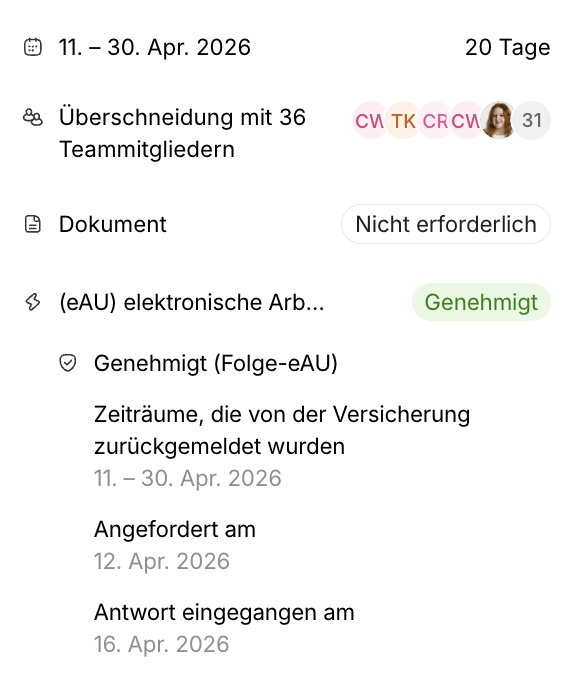
If you want to extend an employee's illness period, proceed as follows:
- Open the corresponding employee profile and switch to the Absence tab.
- Select the absence that you want to edit.
- Click on the pencil icon to edit the absence.
- Enter the new end date and click Save.
Eliminate electronic incapacity for work
Delete an absence after you have sent an EAU request to the health insurance company, only in the following cases:
- Wrong information: If the absence or employee data contains errors and you need to correct the information sent to health insurance.
- Response pending: If you have not yet received an answer from the health insurance company.
Once you have received a definite answer from the insurer (whether the eAU is covered or hasn't been found), you can only delete the absence if the information provided was incorrect.
Please make sure that all information is correct before submission in order to prevent unnecessary deletions.
FAQ
Can an absence period be approved before the eAU has been received?
Yes, the retrieval and approval process run independently of each other. The eAU is automatically requested in the background, while the approval process can be carried out as usual.
Is an eAU also automatically retrieved for “child ill” (teething sick days)?
No. Automatic EAU retrieval is only possible for absence types with the “Illness” category. For children's sick days, a paper certificate must still be uploaded manually.
Does this function also apply to employees with private health insurance?
No. The eAU and automatic retrieval are only available to employees with statutory insurance. Privately insured employees must continue to manually upload their certificate to the employee profile in the corresponding absence.
What happens if the absence period is changed retrospectively?
If an absence period is changed (e.g. extended) after the initial EAU request, Personio Payroll automatically triggers a new EAU query for the changed data. You don't have to do anything manually.
Why do I see multiple EAU entries for an employee?
If there are continuous or extended periods of time, it may happen that several EAU certificates are available for an employee. Since each certificate covers a portion of the total period, this is expected behavior.
Do I have to divide the absence period if there is an initial certificate and a subsequent certificate?
No. It is not necessary to divide the absence period into separate periods. Several EAUs can be assigned to an absence period. Personio Payroll automatically requests follow-up EAUS if the period is not fully covered.
What happens if a follow-up EAU request fails?
If a subsequent EAU request is not successful, the status “Not available” remains. All requests are logged so that, together with Support, you can understand when and why a request was unsuccessful. In this case, contact Personio Support.