This article explains how to manage payment overviews in Personio Payroll. These provide you with a reliable source for verifying payments after the payslip has been approved.
What is a payment summary?
A payment overview is a PDF document that is automatically created when PersonioPayroll is approved. The overview shows a summary of all expected payments in a month that must be made as part of payroll.
What is a payment overview needed for?
The payment overview is used to control and secure the payroll payment process and makes it possible to independently check the amounts contained in the SEPA file before the bank transfer is actually executed. With this additional verification source, transfer errors can be avoided.
Payment overview in Personio Payroll
Before you begin
To view payment summaries, first make sure that you have the following permissions:
- You must have admin rights in Personio
- Personio Payroll must be activated for your company and the corresponding company.
Payment overview structure
Please note:
Note that the file below is an example. All data contained therein is purely fictitious.
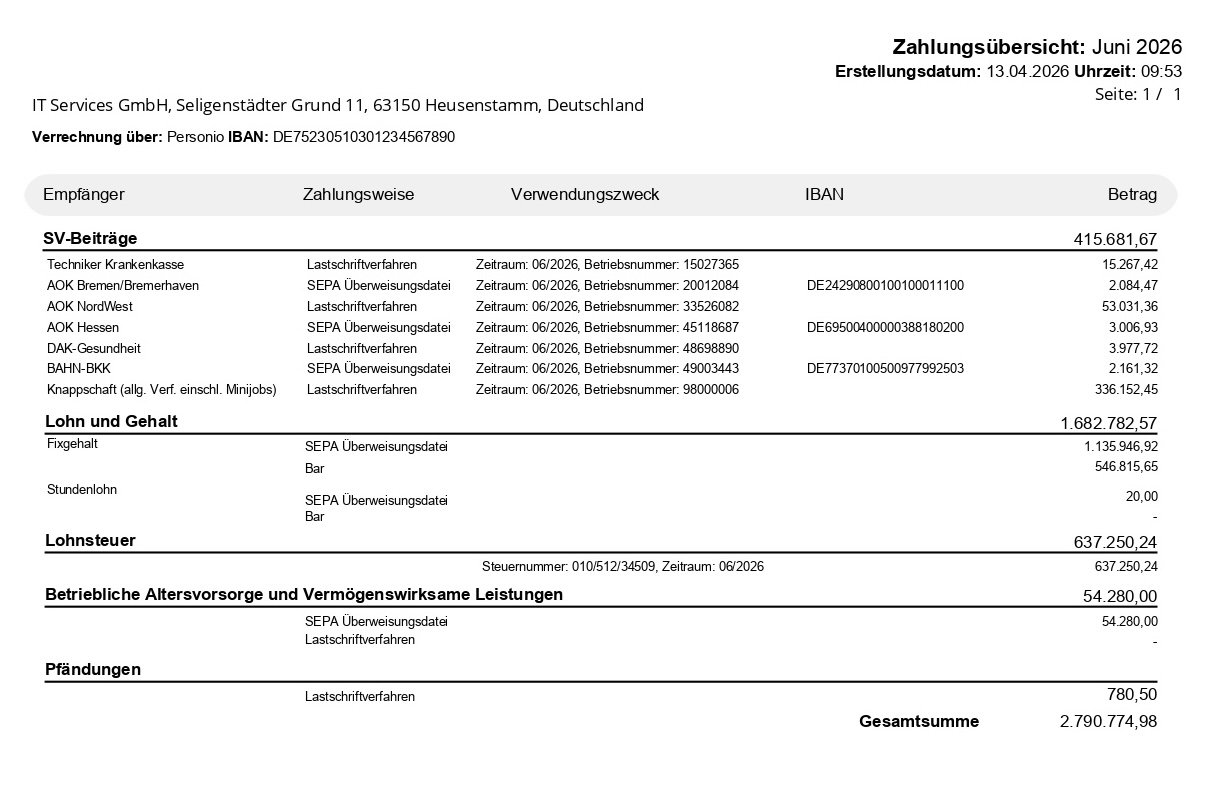
The payment overview includes the following information:
- The billing period for which payments are made
- Recipient, method of payment, purposes of use, IBAN and amount
- Total amount of payments
Managing Payment Overview in Personio Payroll
View payment summary
To view and download the payment overview, follow these steps:
- Open the Payroll section in the main navigation menu.
- Switch to the Documents tab and select the appropriate billing period.
- Find the Payment overview document and open it with one click.
You can then download the file as a PDF document.
Use payment summary
The payment overview includes all expected payments to different recipients. You can use this overview to review the amounts in the SEPA file:
- To do this, open the downloaded payment overview and compare the SEPA amounts.
- Compare payments and recipients
- Check payments to social security institutions
- Check payments to payroll and hourly wage earners
- Check the amount of tax
- Check other payments, such as company pension contributions and garnishments.