This article provides a summary of departments and teams in Personio. Learn how to use them to map your company's organizational structure.
Learn how to create departments and teams.
Understand departments and teams
Personio uses departments and teams as two different organizational structures:
- Departments are large organizational units that group employees by major business functions. Use departments to reflect your primary organizational structure.
- Sub-departments are smaller divisions within departments. They sit below their parent department in the hierarchy.
- Teams are a separate organizational structure from departments, but they work the same way. This means teams can have parent-child relationships across multiple layers. Teams are optional. Use them if your company needs a secondary structure, such as a matrix organization where employees collaborate across departments on specific projects or tasks. Teams can include members from any department.
- Sub-teams are smaller divisions within teams. They focus on specific areas. They sit below their parent team in the hierarchy. Use sub-teams if you have a more complex matrix set up.
How hierarchy works
You create hierarchy in Personio by assigning parent departments or teams. This creates a structured, multi-level organization.
Parent and child relationships
- A parent department or team is the higher-level unit in a hierarchy. For example, Marketing is the parent of Social Media Marketing.
- A child department or team is the lower-level unit in a hierarchy. It sits below its parent in the organizational structure.
When you create a new department or team, you can assign a parent. This creates a hierarchical relationship.
Hierarchy layers
Personio assigns hierarchy layers based on parent-child relationships.
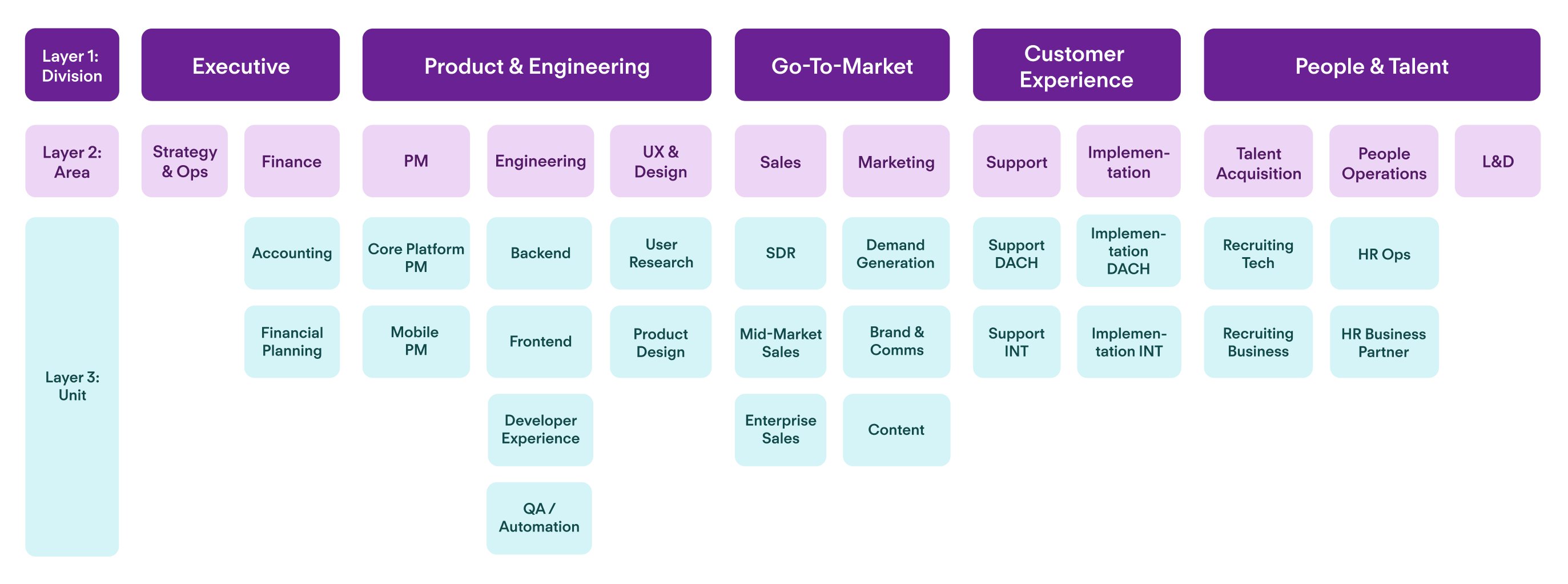
- Layer 1 = Top-level departments/teams (no parent assigned).
- Layer 2 = Departments/teams with a Layer 1 parent.
- Layer 3 = Departments/teams with a Layer 2 parent.
- Layer 4 = Departments/teams with a Layer 3 parent.
- And so on, up to 10 layers for both departments and teams.
Layer 1, Layer 2, etc. are the default layer names. Layer names appear in:
- Employee profiles
- People list
- Org chart
- Reports and analytics
You can filter and analyze data by specific layers in all these areas of Personio.
When to use departments
Use departments to reflect your company's main organizational functions.
Examples of departments:
- Marketing
- Sales
- Product
- Customer Experience
- Finance
- Human Resources
Sub-departments
Sub-departments are smaller divisions within departments. They focus on specific areas within the larger department. You create sub-departments by assigning a parent department when you create a new department.
Examples of sub-departments:
- Performance Marketing (within Marketing)
- Recruiting (within Human Resources)
- Customer Support (within Customer Experience)
When to use teams
Use teams if your company uses a matrix structure. Matrix structures allow employees to collaborate across departments on specific projects or initiatives. In a matrix structure, employees belong to a department and can also belong to one team.
Examples of teams:
- Product Launch A
- Sustainability Committee
- Company Culture Committee
Sub-teams
Sub-teams are smaller divisions within teams. They focus on specific areas within the larger team. You create sub-teams by assigning a parent team when you create a new team.
Examples of sub-teams:
- Customer-facing (within Product Launch A)
- Product Sustainability (within the Sustainability Committee)
- "London" (within the Company Culture Committee)
Example of teams and sub-teams
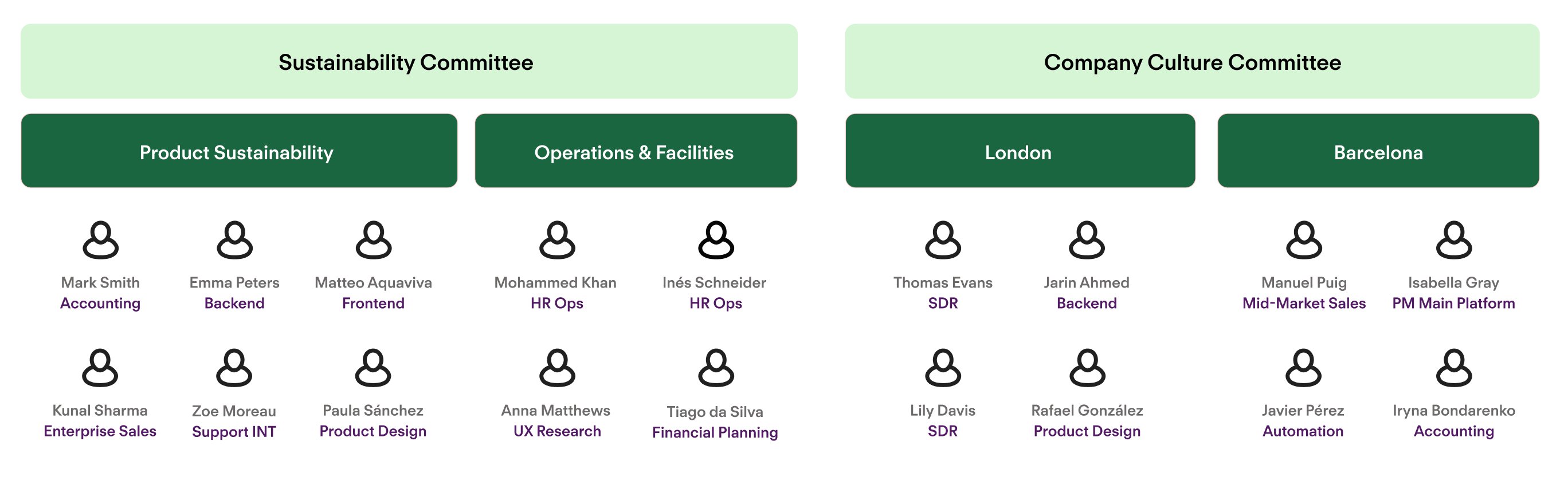
Examples of departments and teams
Example 1: Traditional hierarchy
If your company has a traditional hierarchy, you only need departments and sub-departments. In a traditional hierarchy, employees belong to their lowest-level org unit, which indirectly implies their higher levels. For example, an employee is assigned to the Unit “Brand & Comms,” which implies their indirect belonging to the Marketing area and Go-To-Market Division.
Example of a traditional hierarchical structure
Example 2: Matrix structure
In a matrix structure, employees belong to a department and also one or more teams. This structure supports cross-functional collaboration. Employees from the same or different departments can work together on the same team.
Example of a matrix organizational structure
| Department | Sub-department | Team | Sub-team | |
| Customer Experience | Customer Support | Product Launch A | Customer-facing | |
| Customer Growth | Enablement | |||
| Product | Engineers | Upselling | ||
| Designers | Product Launch B | Customer-facing | ||
| Product Managers | Enablement | |||
| Marketing | Performance Marketing | Product Launch C | Customer-facing | |
| Social Media | Upselling |
| Department | ||||||
| Customer Experience | Product | Marketing | Sales | Finances | ||
| Team | Product Launch A | John | Julie | - | Phil | - |
| Product Launch B | - | Maria | Ellen | - | Oscar | |
| Product Launch C | Benjamin | Marcus | - | Victoria | - | |