We're simplifying employee roles and permissions. With this update, you can better assess, review, and configure user permissions. We've made the interface simpler. We've also moved reminders and two-factor authentication (2FA) settings to more logical locations. This article covers the changes and timeline.
Timeline
| When? | What? |
| November - December 2025 | Reminders and Security tabs move from Employee Roles. |
| Early 2026 |
|
Features moving to new locations (November - December 2025)
The Reminders and Security tabs in the Employee Roles configuration are moving to more logical locations in Personio. This change centralizes these settings with related features.
A banner in the Reminders and Security tabs notifies you about the upcoming changes. After the features move to their new locations, the tabs remain in Employee Roles but take you to the new settings pages. The tabs disappear when the new employee roles and permission management interface launches in early 2026.
Reminders
The Reminders tab is moving from Employee Roles to Automations > Reminders. This keeps all scheduling in one place. Your existing role-specific reminders move automatically to the Automations interface.
Role reminders will remain a separate feature to complement workflows for now. Continue to use role reminders to trigger reminders for all date attributes, including custom attributes. Use workflows if you would like to set up a more complex process based on specific, predefined date fields, such as an employee’s termination date.
With this update, administrators can grant other employees permission to manage role reminders through a new access right. This access right is in the Custom Workflows section of Account configuration.
Two-factor authentication (2FA)
The Security tab is moving from Employee Roles to the Password configuration tab in Settings > Authentication. We're centralizing all authentication and security-related settings under Authentication. This makes managing your account's security easier.
With this update, the permission to configure 2FA moves to Account configuration > Authentication. This makes it easier for your IT team to manage all authentication settings.
New employee roles and permissions interface (Early 2026)
The Employee Roles area is getting a redesign. This new interface makes permissions easier to understand and configure.
Note:
Your existing roles and settings remain unchanged. You don't need to reconfigure anything when the new experience launches.
What's changing:
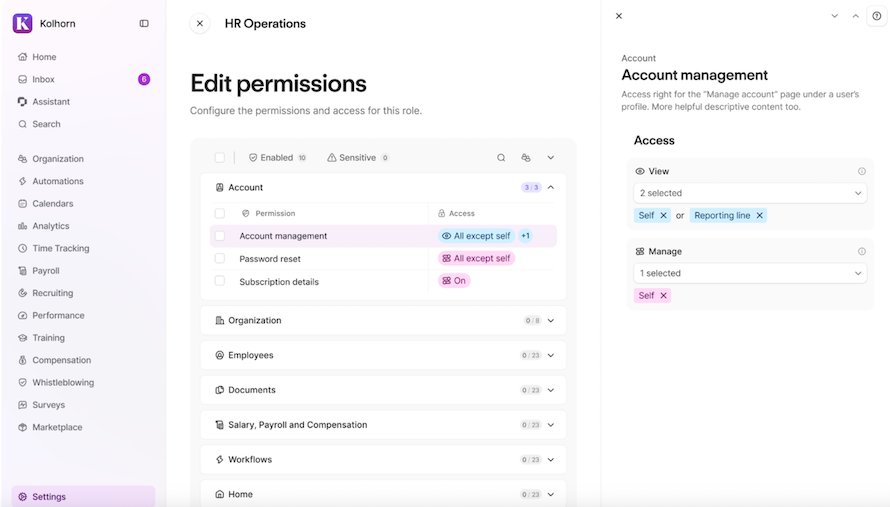
- Clearer permissions structure: a new layout replaces the checkbox interface and groups permissions more logically.
- Improved employee role creation: add custom descriptions for each role to explain its purpose.
- Improved permission naming: easily understand what each permission does
- Focused role configuration: manage role permissions and members in one place. Settings for Reminders and 2FA move to their dedicated areas.
- Centralized calendar access: calendar access rights move into the central permissions system. You can configure calendar access visibility for all relationships. This includes additional supervisors and general relationships.
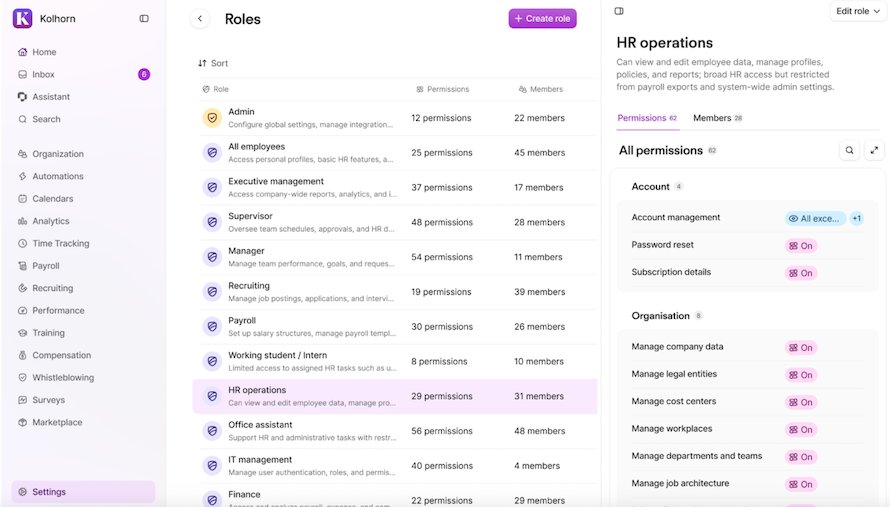
- Better visibility: see and audit permissions directly in the main interface
- Simpler member management: use the groups builder to manage role members.
Examples of the new interface
You can see examples of what the new interface will look like in the following screenshots.
View role permissions
Edit role permissions
Frequently asked questions
Why is this change happening?
Based on your feedback, we're making access rights management simpler, more intuitive, and easier to navigate and audit. This launch has three main improvements:
- A clear role creation experience.
- A way to review permissions provided through Employee roles
- Role descriptions for future reference
Do I lose any features?
No. You still have the same flexibility in managing user access. All employee roles and permissions functionality stays the same. Only the interface is changing.
Can I keep using the old interface?
No. We will continue to improve the new experience based on your feedback, but the old interface won't remain available.
Do reminders now run through workflows? Can I now use custom date attributes for reminders?
Reminder configuration doesn't change with this update. We're exploring future improvements and appreciate your feedback.
- For now, use role reminders to create reminders about custom date attributes.
- For some predefined attributes like Hire Date, you can already start to use workflow reminders.
Can I set "remind me about my own" with reminders in automations?
Reminder configuration doesn't change with this update. We're exploring future improvements and appreciate your feedback.
Can I enable 2FA for all employees with this update?
Yes, with this update, you can enable 2FA for the "All Employees" role.
Can I delegate 2FA settings to non-admin users with this update?
Yes, with this update, the permission to configure 2FA settings for your account moves to the Authentication configuration permission (Account configurations > Authentication). This allows your IT Admins to manage all authentication settings.
Can I delegate reminder configuration to non-admin users with this update?
Yes. With this update, we're introducing a new permission that lets users create and manage reminders under Account configuration > Custom Workflows.
Do I need to configure permissions for my roles again?
No. All your existing employee roles and permissions stay in place. You don't need to do anything.
What other access rights improvements are coming?
We're working on new features, including:
- A view to better analyze employee-level role assignment and permissions.
- Granular access rights to manage attendance policy assignment.
- Scoped access to manage employee permissions.