AI Performance Summaries provide an AI-generated summary of all continuous feedback, manager, peer, and upward reviews, as well as performance notes related to an employee. The feature helps supervisors evaluate performance and write manager reviews.
Before you start
Access rights
To activate AI summaries, you need the Administrator role.
Understand AI summaries
AI summaries synthesize feedback, notes, and reviews about an employee into an aggregated summary to help managers and admins make better decisions. They are meant to support, not replace, the manager's or admin's judgment and should not be the only input for performance decisions or reviews. You can check the summary in the employee profile window and in the side panel when writing a manager review.
The AI summarizes feedback from the previous 12 months. It includes information from the following sources:
- Manager reviews (only if shared).
- Peer and upward reviews.
- Continuous feedback (received).
- Performance notes.
AI summaries don't introduce any new information. All information comes from existing written feedback, not ratings. The summaries rely on the amount of contextual information in the original feedback. The more information the AI finds in the feedback, the better the summary is. The AI updates the summary automatically when the employee receives new feedback.
Visibility and exclusions
The AI Performance Summary only includes sources already visible to the person viewing the summary. Any feedback not shared with them doesn't appear in the summary. The AI Performance Summary doesn't include self reviews and doesn't include feedback that isn't visible to the manager.
There must be a minimum of three reviews, pieces of feedback, or notes to generate a summary.
How the AI weighs sources
The AI weighs feedback based on type to provide a useful summary to assist managers when writing reviews. In order of relevance: most recent manager review, upward reviews, peer reviews, continuous feedback, performance notes, and less recent manager reviews. The AI also puts a higher weight on more recent feedback and reviews. Self reviews are excluded.
The AI includes and prioritizes the most recent manager review because it reliably incorporates the rich, integrated view that managers have of an employee's performance. It also means managers can refer to the last review and ensures that skip-level managers and administrators also see the manager's perspective in the summary. The AI still incorporates other sources to provide a balanced, well‑rounded view.
Activate AI summaries
To activate AI summaries, follow these steps:
- Go to Settings.
- In the Account & support section, click AI features.
- Click the toggle to activate Personio's AI features.
Once activated, supervisors can see AI summaries in the performance profile page of their reports and when writing manager reviews.
Use AI summaries in manager reviews
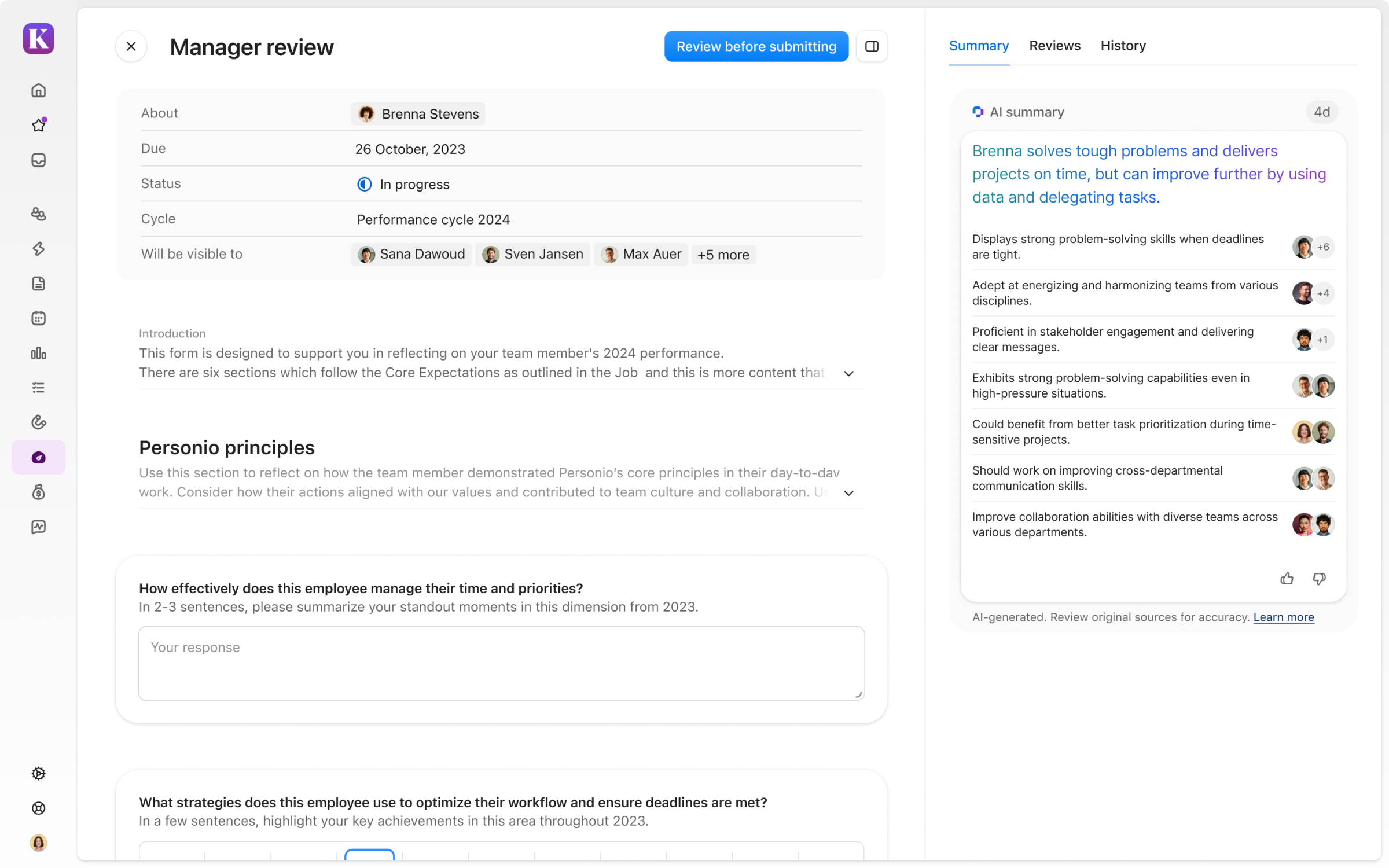
When writing a manager review, you can read the AI summary in the panel on the right:
- Under Summary, access the information by themes for better readability. Click each theme to see the original sources that the AI draws on (feedback, reviews, and performance notes).
- Under History, you can access the summarized feedback in chronological order.
- Optional: You can evaluate the AI assessment of your feedback by clicking the thumbs up or thumbs down icon.