This article explains how to refer a candidate for a job at your company. You might refer a former colleague or someone from your professional network. By making a referral, you can help your company hire high-quality candidates.
Before you start
Your company needs to enable the employee referrals feature. Check if the feature is available in the Shortcuts widget on your Personio homepage.
Submitting a referral involves sharing personal information about the candidate, such as their name and email address. Make sure you get the candidate’s permission before proceeding with the referral.
Submit an employee referral
To submit a referral:
- Go to your Personio homepage.
- In the Shortcuts widget, click Employee Referral.
- Fill out the referral submission form. Find more details about this in the section below.
- Click Refer candidate.
If your company has enabled an automatic confirmation, you receive an email to acknowledge your referral.
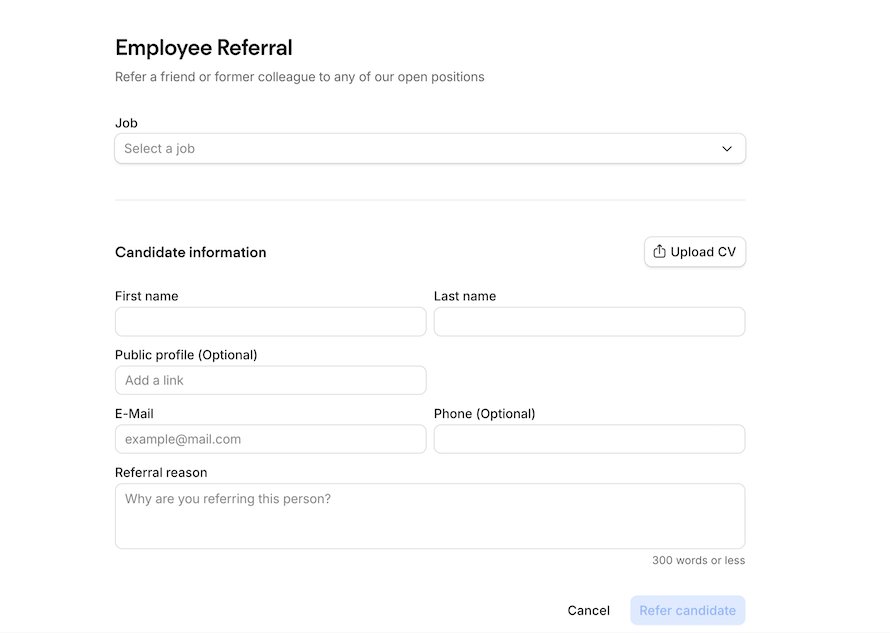
The referral submission form
The referral submission form contains several preset fields. You fill out these fields when making a referral. You can't customize these fields at present.
Refer to the table below for an overview of these fields.
| Field | Details |
| Job | Select an open job from the drop-down menu. |
| Upload CV | Click this button to upload the candidate’s CV. |
| First and last name | The candidate’s first and last name. |
| Public profile | Add a link, for example, to the candidate’s LinkedIn profile. |
| Enter the candidate's email. | |
| Phone | Enter the candidate's phone number. |
| Referral reason | Explain why the candidate is a suitable fit for the job. Personio adds this as a comment in the candidate’s application profile in Personio. |
Refer the same candidate for a different job
You can refer the same candidate for a different job. You need to submit a new employee referral and select a different job from the drop-down menu.
You can’t refer the same candidate for the same job as before. Likewise, you can’t refer them if they apply for the same job through another source. In these instances, you receive a warning message.